

Designing and Building AI Products and Services is not about adding a model to a clean interface. It’s about creating systems that behave predictably, make decisions consistently, and deliver value beyond a single response. Many AI products look polished on the surface — they generate text, answer questions, or analyze data — but they fail to give users the feeling of interacting with a coherent system. The reason is simple: they’re designed as interfaces, not as behaviors.
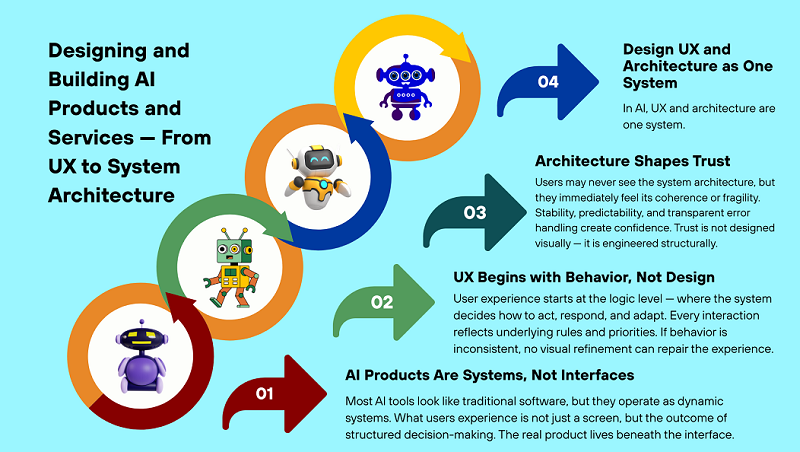
In AI products, UX begins long before the first screen or button. It’s shaped by how the system makes decisions, how it handles errors, and how it behaves in unusual scenarios. Users may never see the architecture, but they always feel its presence. This is why beautiful screens rarely save a product built on unstable logic.
In this article, we’ll explore how Designing and Building AI Products and Services requires treating UX and system architecture as a unified discipline — not at the code level, but at the level of structure, decision flows, and product behavior.
This perspective is especially critical in no-code and low-code environments, where architectural weaknesses surface quickly. We’ll examine where UX truly begins, why design alone can’t fix a broken system, and how to build AI experiences that inspire long-term trust.
1. Designing and Building AI Products and Services: Why UX Starts Before the Interface
In AI products, the user experience doesn’t begin with a login screen or dashboard. Designing and Building AI Products and Services always starts with how the system thinks, reasons, and acts before the interface ever exists. It begins with how the system thinks and acts. The user may not understand how the AI works internally, but they immediately sense chaos or structure. If the system’s behavior is unpredictable, no design will save the situation.
UX in AI is primarily about consistency, logic, and explainability. That’s why the interface is only the final layer, not the starting point. Trying to “finish the UX” after the logic has already been broken is a mistake.
In this section, we’ll explore why UX in AI is product architecture, not visual style. And why UX development should begin long before prototypes and mockups.
UX in AI Products Is System Behavior, Not Visual Design
In classic products, UX is often associated with visuals, but this thinking doesn’t apply to AI systems. Users interact not with screens, but with the system’s behavior. They experience UX in how the AI responds to input, how it interprets context, and what decisions it makes. If a system responds one way today and another tomorrow without explanation, the UX is considered poor. Even with perfect design. Good UX in AI is predictability without a sense of rigidity. It’s when the user understands what to expect from the product. Therefore, UX in AI is the result of well-designed logic, not a well-designed UI. Design merely visualizes an already-adopted system decision. If decisions are chaotic, the UX will be the same.
Why Good UX Can’t Fix a Broken AI System
A beautiful interface is often used as a mask for weak logic. This may work for the first few users, but only briefly. When the AI starts making mistakes, getting confused, or giving inconsistent answers, the UX collapses instantly. The user loses trust in the product, even if they like the design. This is because UX can’t compensate for the lack of a decision-making system. If the product doesn’t understand the user’s goal, the interface won’t save it. In AI products, UX is a consequence of the architecture, not the other way around. This is why many projects look “good” but fail to retain users. This is one of the key reasons why AI products fail to reach real users and die early on.
Designing UX for Trust, Not Wow-Effect
In AI products, the main currency isn’t the wow factor, but trust. Users may be surprised once, but they’ll only use what they trust. Wow-effect responses often look impressive, but they’re unstable. And instability ruins UX faster than anything else. Good UX in AI is when the system explains its behavior through actions, not lengthy prompts. Users should feel like the product understands their task. UX should reduce cognitive load, not add to it. This is achieved not by animations, but by the structure of solutions. When users see logic, even errors are more easily accepted. This is how UX transforms from a show into a working tool.
2. From User Actions to Product Logic
In AI products, there’s always a layer of interpretation between a user’s action and the result. This layer is often underestimated, even though Designing and Building AI Products and Services depends on how well intent is separated from interface actions.
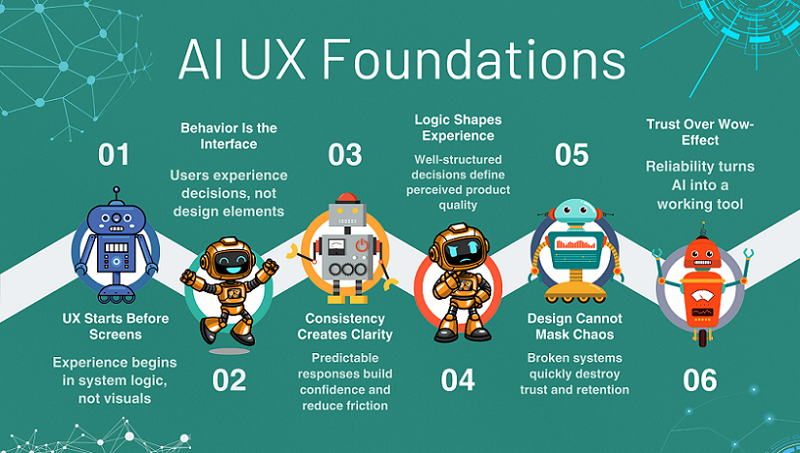
The user clicks a button, enters text, or loads data, but the product doesn’t care about that. It’s important to understand why they’re doing it. This is where most products start to break down, because they continue to think in terms of screens and scenarios. This is acceptable in classic UX, but not in AI. An AI product must work with intent, not clicks. When logic is built around actions, the system becomes fragile and doesn’t scale well. When logic is built around meaning, the product begins to behave like a system.
This section shows how to move from superficial UX thinking to product logic. Without delving into architecture, but with a clear understanding of the system’s responsibilities. This is the foundation for predictable AI behavior. And this is where UX becomes a product.
Mapping User Intent When Designing AI Products and Services
In traditional products, user flows describe the user’s journey through screens. In AI products, this approach quickly becomes unworkable. Users can reach the same goal in different ways, and the system must understand this. Therefore, instead of click flows, it’s important to model intent. Intent is not an action, but the goal behind it. When a product understands intent, it can adapt behavior without changing the interface. This makes the system flexible and resilient. In this approach, UX becomes a consequence of logic, not its source. The user feels that the product “understands” them, even if they act unconventionally. It is intent-based thinking that allows AI products to appear smarter than they actually are. And this is a direct bridge to systems thinking.
Translating UX Signals Into System Decisions
Every user action is a signal, not a command. Entering text, repeating a request, or correcting a result carries context. The task of an AI system is to correctly interpret this context. The mistake many products make is that they react to the interface rather than the meaning of what’s happening. AI shouldn’t “see a button”; it should understand the situation. When UX signals are transformed into system decisions, the product becomes alive. It begins to adjust behavior, not simply follow instructions. This reduces errors and repeated requests. The user experiences it as a smooth and logical experience. This approach prepares the product for growth without complicating the UX. And this is where architectural thinking begins, without technical overload.
Where UX Ends and System Responsibility Begins
One of the most common mistakes is shifting logic to the user. When a product requires “formulating a request correctly,” the UX is already broken. The interface should collect signals, not make decisions. Decisions are the responsibility of the system. When the boundary is blurred, the product becomes tedious and unpredictable. The user begins to adapt to the AI, not the other way around. A good AI product internalizes complexity and externalizes simplicity. UX ends where decision making begins. Everything related to interpretation, context, and action selection must be internal to the system. This is directly related to the idea that a product is a chain of decisions, not a set of functions. And this is what distinguishes a product from a tool.
3. From UX Thinking to AI Product Logic
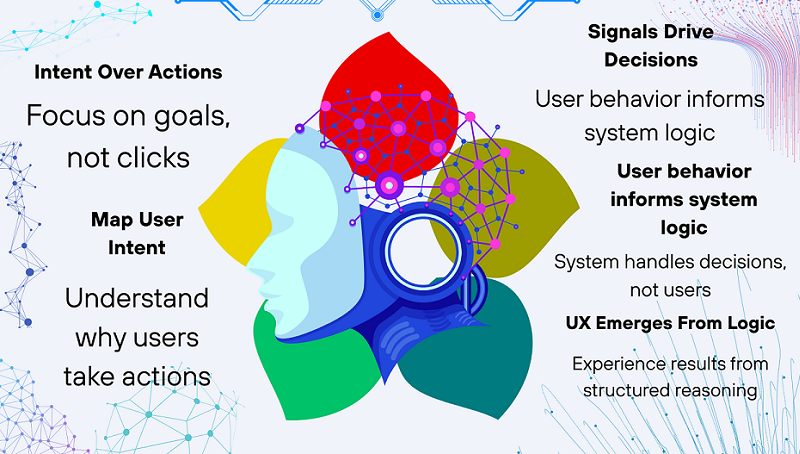
In AI products, the user journey can’t be viewed as a series of clicks. Designing and Building AI Products and Services requires shifting from interface-driven flows to intent-driven logic. Actions are simply external signals, always based on intent. When a product responds solely to the interface, it quickly hits the limit of its logic. This is why many AI services appear smart in demos but break down in real-world use.
For a product to be robust, it must understand what the user is trying to solve, not just what they clicked. This is where UX begins to seamlessly transition into product logic. This is the point where design ceases to be visual and becomes semantic. An AI product begins to behave like a system, not a form with buttons. This approach simplifies product development without rewriting the entire UX. And this is where the foundation for codeless architectural thinking is laid.
Intent-Based Design in AI Products and Services
Traditional user flows describe the user’s journey through screens. In AI products, this approach quickly breaks down because users act nonlinearly. The same intent can be expressed in different ways. If the system doesn’t understand this, the product begins to feel “dumb.” An intent-based approach shifts the focus from the path to the goal. AI begins to address the user’s task, not their behavior in the interface. This makes the product more flexible and resilient to non-standard scenarios. The user feels understood by the system, even if their request is not perfectly formulated. This approach directly leads to systems thinking.
Translating UX Signals Into System Decisions
Every user action is a signal, not an instruction. Repeating a request, correcting a result, or pausing between actions carries meaning. The task of an AI product is to transform these signals into decisions. When a system responds only to UI events, it loses context. In strong products, AI responds to the situation, not the button. This reduces errors and increases the product’s perceived intelligence. The user doesn’t have to think about logic—they simply see that the product is behaving appropriately. This approach prepares the product for growth without complicating the interface.
Where UX Ends and System Responsibility Begins
One of the key mistakes is forcing the user to compensate for a weak system. When UX requires “asking the right question,” this is a signal of a problem. The interface should collect input, not make decisions. All complex interpretations should occur within the system. If the boundary is blurred, the product becomes tedious. The user begins to adapt to the AI, not the other way around. A good AI product hides complexity rather than exposes it. This is where the idea that a product is a chain of decisions, not a set of screens, comes into play.
4. Designing and Building AI Product Architecture Without Code
AI product architecture is often perceived as something technical and intimidating. In reality, Designing and Building AI Products and Services in a no-code context is primarily about logic, decisions, and structure — not technology. In fact, in a no-code context, architecture is about logic, not technology. It’s a way to organize thinking about the product.
A good architecture answers the question “what’s going on underneath the hood,” even without code. It defines how the product makes decisions and responds to the user. Without architecture, an AI product turns into a set of disconnected prompts. With architecture, it becomes a system that can evolve. It’s important to understand this before choosing tools. Then, no-code becomes an accelerator, not a constraint. This block helps alleviate the fear of the word “architecture” and prepares for a deeper dive into the pillars.
What “Architecture” Means in No-Code AI Products
In no-code AI products, architecture isn’t diagrams and servers. It’s a decision-making structure. Architecture is responsible for when, why, and how the system acts. It resides in logic, not in tools. Even the simplest AI product already has an architecture—the only question is whether it’s conscious or not. When the architecture is well-thought-out, the product is easier to improve. Without it, any change breaks its behavior. This approach allows for systemic thinking without technical overload.
Input, Context, Processing, Output as a Core Model
Any AI product can be broken down into four parts: input, context, processing, and output. Input isn’t just text, but everything the system receives. Context is what helps interpret this input. Processing is the decision-making logic within the product. Output isn’t text, but a useful result for the user. This model is simple yet universal. It’s suitable for any no-code AI product. Understanding this framework immediately simplifies thinking about the product.
Why Tools Don’t Define Architecture
Choosing a platform is the most overrated step in no-code AI. Tools don’t define the architecture, they merely implement it. Without clear logic, even the best service won’t save the product. Architecture lives in solutions, not in settings. When the logic is clear, tools are easy to change. When there’s no logic, changing platforms is useless. This section helps the reader avoid getting stuck in comparing services and focus on what truly impacts the quality of the product. This approach is what distinguishes a product founder from a “tool hoarder.”
5. Designing Context as a Core Layer of AI Products and Service
In most AI products, context is perceived as an auxiliary detail rather than a separate product layer. Because of this, the system appears intelligent only within the context of a single request. As soon as the user steps outside the context, the logic falls apart.
Context is what connects past actions, the current goal, and the expected outcome. Without it, AI responds formally rather than meaningfully. This is why UX can be cluttered, but the experience can be frustrating. When context is designed correctly, the product begins to behave consistently. The user feels that the system is “in the know,” rather than starting over every time. This layer is rarely visible, but it directly impacts trust. Context is not memory for memory’s sake, but a decision-making tool. And in mature AI products, it becomes a fully-fledged part of the architecture.
Context Is the Missing Layer Between UX and AI
Context is the bridge between what the user does and how the system responds. UX collects signals, AI processes data, but without context, a gap arises. As a result, the product behaves inconsistently. The user expects logic, but receives random responses. Context allows AI to understand the situation, not just a single request. This is where UX thinking and systems logic merge. This approach fits well with step-by-step product development, where meaning emerges first, and automation follows. Without this layer, even the most careful no-code product quickly hits a ceiling.
What the System Must Remember to Feel Intelligent
For a product to feel intelligent, it must remember the right things, not just everything. First and foremost, the user’s goal. Then, the constraints within which this goal must be achieved. The current state is also important: what has already been done and what is expected next. All this creates a sense of continuity. The user doesn’t have to verbalize it, but they immediately feel the difference. When the system “remembers” the context, interaction becomes smooth. AI ceases to be seen as a tool and begins to be perceived as a service. This directly increases trust and reduces frustration.
How Poor Context Design Breaks UX
The most common mistake is treating every request as the first. This leads to contradictory responses. The user is forced to repeat the same thing in different words. The product’s logic falls apart, even if the model is strong. On the surface, this looks like “stupid AI.” In reality, the problem isn’t with intelligence, but with structure. Poor context breaks UX faster than a bad interface. Users leave not because of the design, but because of the feeling of chaos. And this is fixed not by prompts, but by architectural solutions.
6. Decision-Making as the Core of AI Services
The true value of an AI service is not in text generation, but in decision making. This is a central principle when Designing and Building AI Products and Services that aim to behave like real services rather than smart tools. When a product decides for the user, it saves time and reduces workload. If AI only generates options, the user is left alone with the problem. That’s why decision-making is only the basic level.
Decisions shape the product logic. They determine what to show, what to hide, and how to respond to errors. Both the UX and the architecture depend on decisions. When decisions are unclear, the product appears chaotic. When they are clear, the system scales without complicating the interface. This is the core of AI services.
AI as a Decision Engine, Not a Generator
Generation is a means, not an end. The user cares about the result, not the answer itself. When AI makes decisions, it relieves the user of some responsibility. This creates the feeling of a service, not a tool. Decisions can be simple, but they must be consistent. They shape the product’s behavior. This approach directly supports scalability. The less the user thinks about “how,” the higher the product’s value. And the closer the AI service is to a real product.
What Decisions Should Be Automated First
Not all decisions should be immediately delegated to AI. Repetitive and predictable choices are automated first—those where error isn’t critical, but the time savings are significant. Complex and risky decisions are best left under user control. This approach reduces stress and builds trust. The product doesn’t try to be smarter than necessary. It helps where it’s truly useful. This is a product strategy, not a technical limitation. And it’s precisely this that protects the system from overload.
How Decisions Shape Both UX and Architecture
Every decision made by AI impacts two layers at once. UX – through what the user sees and feels. Architecture – through processing logic and context. If decisions are well-thought-out, the interface becomes simpler. If not, UX begins to compensate for a weak system. Architecture always follows decision logic, not the other way around. Therefore, design without understanding decisions is doomed. In strong AI products, decisions are defined first, and screens are created second. This is what distinguishes a service from a set of features.
7. Connecting UX, Architecture, and Scale
At this stage, it’s important to bring everything we’ve discussed so far together into a single picture. UX, architecture, and scale are not different stages of a product’s lifespan, but interconnected layers of a single system. In AI products, they are especially closely intertwined because the system’s behavior is directly experienced by the user.
Problems arise when these layers develop out of sync: UX is improved without changing the logic; architecture is complicated without considering the user experience. While this may be subtle at first, as users grow, such gaps quickly devolve into systemic chaos.
A well-designed AI product considers scale at the design level, not at the infrastructure level. It’s not about load or servers, but whether the product’s logic can withstand changing scenarios, behaviors, and user expectations. In this section, we’ll explore why the UX + architecture pairing is key to sustainability, how to design a system with room for change, and when it’s time to stop “designing” and start testing the product with real people.
Why Products Break When UX and Architecture Drift Apart
One of the most common reasons for AI product failure is when the UX takes on a life of its own, while the system does its own. The interface is improved, simplified, and new scenarios are added, but the underlying logic remains the same.
As a result, the user perceives the product as having become “smarter,” but the system is unprepared to support this behavior. The AI begins to respond inconsistently, becomes confused, and loses context.
Such problems are rarely noticeable in the early stages because users are few and scenarios are predictable. But as the product grows, any discrepancy between the UX promise and the system’s reality becomes critical.
The product becomes unreliable, and the team begins patching holes instead of developing. This is why UX and architecture should be designed as a unified whole, not as independent layers.
Designing for Change Without Rebuilding Everything
Change is an inevitable part of any AI product’s life. Users evolve, scenarios become more complex, and quality requirements increase. The problem isn’t the changes themselves, but how the system prepares for them.
If the architecture is tied to specific screens, prompts, or tools, any change turns into a rewrite of the entire product. This is expensive, slow, and demotivating.
A flexible system is designed around decisions, context, and logic, not implementation. Then you can change the UX, add new scenarios, or improve AI behavior without breaking the foundation.
This approach allows the product to evolve gradually, rather than through painful “relaunches.” It’s a direct bridge to scalability.
When to Stop Designing and Start Testing with Users
There comes a point when further design stops being useful. The logic is established, the system is clear, the UX is well thought out — and then comes the realm of hypotheses.
Many founders get stuck here, endlessly refining the design instead of testing it with real users. But AI products cannot be perfected in theory.
Only real-world use reveals where the system behaves unexpectedly, which decisions are unnecessary, and which are missing. This is where weaknesses in context, logic, and UX are identified.
But testing is not only about interface or behavior — it’s about validating the core idea behind the product. If the initial problem is weak, no amount of architectural clarity will save it.
If you’re still shaping your product direction, start with the fundamentals. Our free lesson — Day 1 — Where to Find Great SaaS Ideas (and How to Vet Them) — walks through how to systematically discover SaaS opportunities, evaluate real demand, and avoid building technically impressive systems that nobody actually needs.
Early testing doesn’t mean scaling. It’s a way to ensure that the system can, in principle, withstand life beyond your imagination. And it’s this step that separates a product from a concept.
Final Thoughts
AI products don’t break suddenly. They break gradually — due to decisions made too early or too superficially. In most cases, the failure has little to do with models or tools, and everything to do with how Designing and Building AI Products and Services was approached from the start.
UX without logic creates the illusion of convenience. Architecture without user insight creates the illusion of reliability. AI without solutions creates the illusion of intelligence. And all these illusions work only until the first serious use.
Good AI products feel simple on the outside and thoughtful on the inside. The user doesn’t see the architecture, but they feel it through stability, predictability, and trust. This is true UX in AI services.
It’s important to understand: no-code doesn’t free you from thinking. It only removes technical noise, leaving you alone with the product logic. And this is where many projects stumble.
If you’ve read this far, it means you’re already thinking about the product more deeply than most. The next step is to understand how all of this can be turned into a scalable system that can grow without constant rework.
If you want to go deeper into how to turn this architectural thinking into a practical, scalable no-code system, explore our complete guide on how to build scalable AI products without code. There we break down the exact structural principles, system layers, and product decisions that allow AI services to grow without collapsing under complexity.