
how-to-build-an-ai-product-step-by-step

How to Build an AI Product Step by Step — From Idea to First Users (No Code)

How to Build an AI Product is one of the most important questions in today’s rapidly evolving digital economy. The product market is changing faster than ever before, and traditional development approaches are no longer the only path to success.

Launching a valuable digital product no longer requires deep programming expertise, a full development team, or months of complex coding. Today, competitive advantage belongs to those who clearly understand the problem, move quickly, and know how to turn artificial intelligence into a practical, working solution.

This shift is especially visible in the AI-powered micro-SaaS space. A new generation of product creators is emerging — experts, marketers, analysts, and founders without technical backgrounds — who are building scalable AI products without writing code. The market increasingly rewards systems thinking, speed of execution, and clarity of vision over “deep” engineering complexity.

At the same time, most people still fear, “Without code, I can’t create a real AI product.” Or, at the other extreme, when an AI product is understood as a simple chat with a few tips, it’s a simple process. As a result, dozens of projects are emerging that look like tools but never become products.

In this article, we’ll walk you through the step-by-step process of creating a fully-fledged AI product without code, not just an interface on top of a model. You’ll understand the logical building blocks of such a product, how it makes decisions, how it works with context, and why this makes it scalable. We’ll speak in simple language, without technical noise, but with a depth often lacking in guides.

This article is about the mindset of a product founder in the AI era.

If you want to create micro-SaaS products that actually find users, rather than die at the idea stage, you’ve come to the right place.
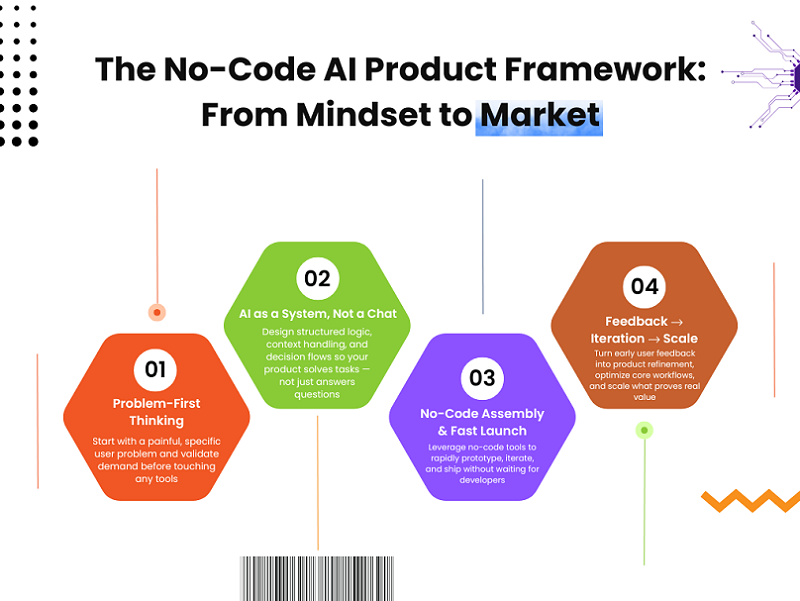
1. What Do We Call an AI product (and where everyone gets confused)

The term “AI product” is overused these days. Some use it to describe a chat with prompts, others to describe API-based automation, and still others to describe any interface with a “Generate” button. This creates the illusion that many are already building a product, when in fact, they only have a tool or a wrapper around a model.

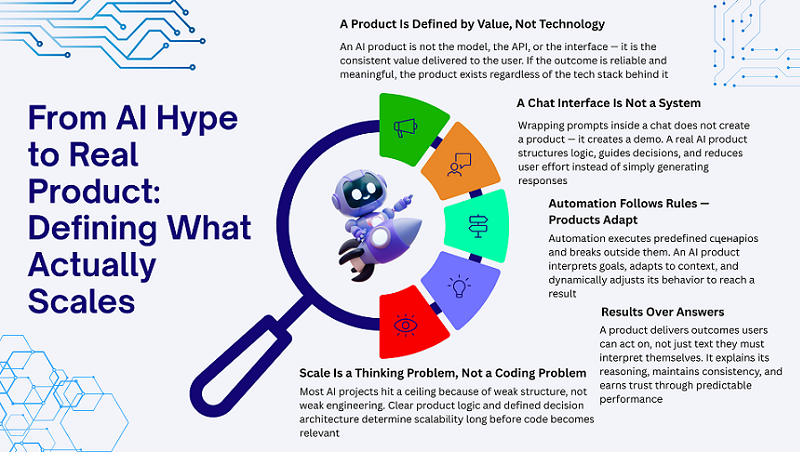
In this section, it’s important to clarify the concepts, because without it, everything will be built on a shaky foundation. An AI product isn’t about the technology, the model, or the service you use. It’s about the value the system consistently delivers to the user.

If you don’t separate these things from the very beginning, the product is almost guaranteed to hit a ceiling with the first few users. Therefore, let’s first understand what makes a product a product, not just a set of features. Only then does it make sense to talk about steps, scaling, and growth.

An AI product ≠ a Chat with Prompts

Most so-called AI products are actually just a regular chat with a pre-written prompt. The user enters something, the model responds, and that’s it. This may look impressive at first, especially if the answers are good.

The problem is that this approach doesn’t create a system. It doesn’t make decisions, doesn’t consider context, and doesn’t guide the user to a result. It’s simply an interface on top of the model.

An AI product begins when the system takes over some of the thinking, rather than simply generating text. If you remove the user from the process of making every step, that’s when the product emerges. Everything else is just a demo.

How a Product Differs from Automation

Automation solves a specific problem according to a predetermined scenario. If the conditions are met, it works; if not, it breaks. An AI product takes a different approach: it adapts to the situation rather than simply following instructions.

The product considers the user’s goal, their context, and possible scenarios. It doesn’t simply “do an action,” but helps them make a decision or reach a result.

This is where the line between automation and a product is drawn. If a system can’t choose and adapt, it’s a set of scripts, even if it’s powered by AI. And such projects almost always come down to scale.

How to Know You’re Creating a Product

There’s a simple way to check this without using complicated terms. First, the product can explain why it performs a particular step. Second, it delivers a result, not just an answer. And third, it works consistently and reliably for different users, not just for the “ideal scenario.”

If a system requires manual edits, clarifications, and monitoring every time, it’s not a product. A true AI product reduces the user’s cognitive load, rather than shifting it onto them.

If you see that the user trusts the system and follows its logic, that’s a good sign. This means you’re no longer creating a tool, but a product.

Why code isn’t even important here

A common mistake is to think that scale and quality are limited by code. In practice, it’s the opposite. Most AI products fail not because of technical limitations, but because of a lack of structure and logic.

You can write perfect code, but if the product doesn’t understand what it does and why, it won’t scale. Conversely, a well-designed system can evolve for a long time without any programming at all.

Code is just a way of implementing it. Growth is limited by thinking: how you define the problem, solutions, and product behavior. That’s where you need to start.
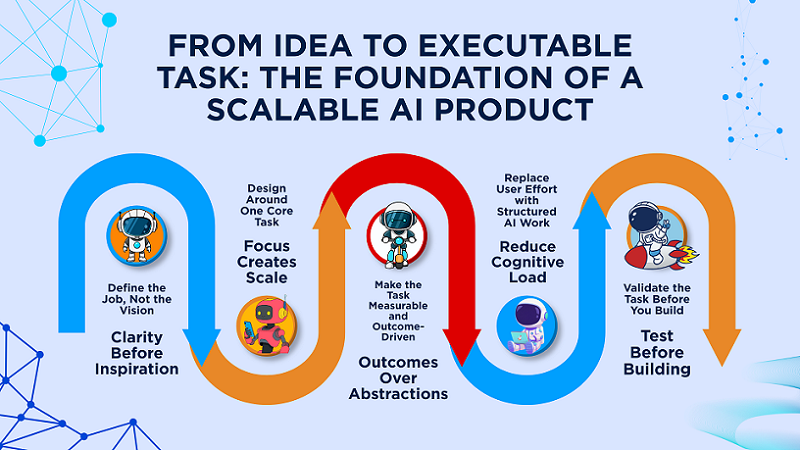
2. Clearly Define the Task, Not the Idea

Almost all AI product problems begin with the phrase “I have an idea.” The idea sounds inspiring, but it’s too vague to build a system on. AI doesn’t handle abstractions well, but it’s great at concrete work.

Therefore, the first and most important step is to stop thinking in terms of ideas and start thinking in terms of tasks. Not “what we want to do,” but what job the product performs for the user.

If this step is skipped or done pro forma, everything will fall apart: the UX, the logic, and scaling. But if the task is clearly defined, half the product is already built. In this section, we’ll look at how to do this as simply as possible.

This is exactly where most AI products quietly fail — long before prompts, tools, or automation even matter.

Founders often jump straight into defining tasks without validating whether the underlying idea is worth turning into a system at all. As a result, the task may be well-defined technically, but irrelevant from a market perspective.

A scalable AI product always starts one level earlier: with a strong, narrow SaaS idea grounded in a real problem. If the problem is weak, no amount of task clarity will save the product later. You’ll end up optimizing logic for something users don’t truly need.

Before defining what the AI should do, it’s essential to understand *which problems are actually worth solving* and how to quickly filter out ideas that sound good but fail in reality.

If you want a practical, no-fluff breakdown of how to find strong SaaS ideas and validate them before building anything, this free lesson walks through the exact process: Day 1 — Where to Find Great SaaS Ideas (and how to vet them)

This step ensures that every task you define later is anchored in real demand, not assumptions.

Not “what to do,” but “what job does AI perform”

The phrase “AI helps write texts” means nothing. But “AI turns a rough brief into a finished draft for a specific purpose” is a task. The AI Job To Be Done approach helps eliminate unnecessary distractions and focus on results.

It’s not the technologies used that matter, but what work the user no longer wants to do themselves. If AI takes over this work, the product will be in demand.

A clearly defined task immediately suggests the logic, context, and solutions the system needs. Everything else is built around this.

One Task is Better than Ten Features

Many people believe that more features = more value. In AI products, this is almost always a mistake. Each new feature increases system complexity and reduces stability.

One well-solved task scales much better than ten superficial ones. Users value predictability and a clear outcome, not a set of features.

Focus simplifies not only the product but also marketing, onboarding, and growth. This is why most successful micro-SaaS start with a single task.

Examples of Good and Bad AI Tasks

A bad task is: “AI helps entrepreneurs.” A good one is: “AI analyzes incoming leads and suggests the next step.” In the first case, it’s unclear what the product does; in the second, everything is clear.

A good task is always measurable, limited, and tied to a specific outcome. A bad one is abstract and requires constant clarification from the user.

If the task is difficult to explain in a single sentence without “and,” “or,” and “plus,” it’s likely poorly formulated.

How to Test a Task Before Building a Product

There’s a simple sanity check. Imagine an AI performing a task perfectly. Is the user willing to pay for it or use the product regularly? If not, the task is weak.

The second test is whether the process can be described in words, without an interface or code. If the logic falls apart at this stage, the product will also fall apart later.

This type of check saves months of work and helps immediately weed out ideas that sound good but don’t work in practice.
3. Break the Product Into a System, Not Screens

Most no-code AI products start from screens: dashboard, chat window, settings, buttons. This feels logical, especially for founders with a design background. But screens are just the surface — they hide how the product actually works.

When you think in screens, you optimize UI, not decisions. And AI products fail not because of bad UI, but because of broken logic underneath.

A scalable AI product should be designed as a system first, and only then wrapped into interfaces.

System thinking forces you to define inputs, transformations, and outputs explicitly.

This makes the product easier to debug, extend, and automate later. More importantly, it prevents the “it works in demo but breaks in ” problem.

In this section, we’ll reframe how to think about AI products before touching any no-code tools.

Why Screens Kill Product Thinking

Screens push you to focus on how things look, not how decisions are made. Most no-code projects fail because founders design flows instead of logic. A beautiful interface can hide a fundamentally weak system underneath.

When something breaks, you don’t know where or why. AI products especially suffer from this, because errors are often invisible at first. System-first thinking forces clarity before complexity appears.

What “a System” Means in an AI Product

A system is a sequence of steps that turns raw input into user value. It doesn’t require architectural diagrams or technical jargon.

At its core, it answers four questions: what comes in, what happens inside, and what comes out. AI is just one component inside this flow, not the whole product.

When you define the system clearly, tools become replaceable. That’s how no-code products avoid being fragile.

Input: What the AI Actually Receives

Most founders think the input is “the prompt”. That’s only the visible layer. In reality, input includes user intent, prior actions, constraints, and product state.

If you don’t define this explicitly, the AI is forced to guess. Guessing works with early users, but fails at scale. Clear inputs reduce hallucinations and increase consistency. Good AI products don’t rely on luck — they rely on structure.

Output: What Counts as a Result

The output of an AI product is not text. It’s value. Sometimes that value is a decision, sometimes a summary, sometimes a next action.

If you measure success by “good answers”, you’ll miss the real problem. Users care about outcomes, not eloquence.

A strong system defines what success looks like before generating anything. That’s how AI becomes useful, not just impressive.

A strong system defines what success looks like before generating anything.

That’s how AI becomes useful, not just impressive.

4. Design Context, Not Prompts

Most beginners obsess over prompts. They tweak wording, add instructions, and hope for better results.

This works temporarily, but it doesn’t scale. Prompts are fragile because they lack memory, structure, and awareness of the product state.

Context is what makes AI behave consistently across sessions and users.

It defines why the request exists, not just what is being asked.

When context is designed properly, prompts become short and stable.

This is one of the biggest mindset shifts in building no-code AI products.

Why AI Breaks Without Context

Without context, AI treats every request as isolated. This leads to contradictions, repeated questions, and shallow outputs.

The problem often isn’t visible with the first users. It appears only when usage patterns diversify. At that point, prompt tweaks stop working. Context is what prevents the system from falling apart under real usage.

Core Types of Context in AI Products

There are four main types of context: history, goal, constraints, and state. History explains what already happened. Goals define what the user is trying to achieve. Constraints limit what is allowed. State reflects where the process currently stands. Together, they give AI situational awareness.

How to Store and Update Context Without Code

Context management is about logic, not tools. You decide what must persist and what can expire.

Some context lives across sessions, some only within a single flow. The key is to update context after meaningful actions, not every message.

This keeps the system lightweight and predictable. No-code tools can store data, but you design the rules.

The “Every Request From Scratch” Anti-Pattern

Treating each request as new is the fastest way to kill product intelligence. It forces the AI to re-learn the same things repeatedly. This increases costs and decreases quality. More importantly, it breaks the user’s mental model. Users expect the product to “remember”. Persistent context is what makes AI feel like a system, not a toy.

5. Turning an AI Idea Into a Working Product System

At this stage, it’s crucial to make a key shift in thinking: stop perceiving an AI product as a set of screens or functions and start seeing it as a system. This is where most no-code projects either start to grow or get stuck forever.

The problem isn’t the tools or the lack of code, but rather the product’s lack of understanding of how it should work in different situations. A system is what connects inputs, context, logic, and output into a coherent whole. Without this, the product only works in demo mode.

In this section, we won’t delve into architecture. The goal here is simpler: to demonstrate how to think systemically, even when building a product without code. This is the foundation without which scalability and stability are impossible.

Product ≠ Screens: Why Interfaces Don’t Define AI Products

Most no-code products start with screens: chat, dashboard, settings, buttons. This creates a sense of progress, but in reality, it distracts from the essence. The interface is a shell, not a product. When thinking gets stuck on the UI, the decisions within the system remain unformulated.

This is where the first mistakes appear: the product “looks” finished, but behaves unpredictably. The system begins to break down under non-standard requests. Ultimately, the design becomes a crutch that hides a lack of logic. Therefore, in AI products, the system is always more important than the interface—the interface can be replaced, but the system cannot.

Context Over Prompts: What Makes AI Behave Predictably

Many people think that the quality of an AI product depends on a perfect prompt. This may work at the start, but not at scale. A prompt is just one signal, not the whole picture.

Context is an understanding of why the user is making a request, what state they’re in, and what’s happened before. Without this, the AI starts from scratch every time. The product loses consistency, and the user loses trust. It’s the context that makes AI behavior stable and predictable, and this is immediately noticeable, even if a human can’t explain why.

Decisions, Not Generation: Where Real Product Value Lives

Text generation alone doesn’t create a product. It can be useful, but value only emerges when the system starts making decisions. An AI product’s value isn’t in the way it answers beautifully, but in the way it guides the user to a result.

Real products decide what to do next, which option is better, where the user is making mistakes. If AI simply generates, it’s a tool. If it chooses, guides, and limits, it’s a product.

This is where the line between a tool and a system is drawn. We explore this distinction in depth in How to Build Scalable AI Products Without Code (Using ChatGPT as the Core Layer) — where we break down the architectural principles behind decision-driven AI systems. Here we’ll only hint at it: scalable AI products are built around decisions, not text.

6. From Prototype to First Users (Without Breaking the System)

The transition from prototype to first users is the most fragile stage in the life of an AI product. This is where most projects fail, even if the idea itself is strong. The problem is rarely related to the model, tools, or lack of code. More often than not, the system is simply not prepared for real-world human behavior.

At the prototype stage, everything seems logical and manageable, but first users wreak havoc. They use the product differently than expected, ask the “wrong” questions, and break the flowcharts. The goal of this stage is not growth, but testing the viability of the system. You need to reach users without the product falling apart under the first pressure. That’s what this section is about: how to carefully transition into reality without destroying logic and trust.

Why Most AI Products Never Reach Real Users

Most AI products get stuck before their first users, and the reason is almost never technical. People endlessly refine, rewrite, and improve something that no one uses yet. This is often driven by fear: the fear that the product is “not good enough.”

No-code isn’t a solution here, because it speeds up the build process but doesn’t eliminate uncertainty. Ultimately, the product exists only in the creator’s mind. The longer the release is delayed, the harder it becomes to take the first step. And without real users, the system remains a hypothesis.

What “Minimum Viable” Means for AI Products

For AI products, an MVP isn’t a “bare bones” or “unfinished” product. It’s a system that reliably does one thing. The user doesn’t care how many features it contains, as long as the outcome is predictable.

At launch, the core should work: input → logic → output. Everything else can be deliberately simplified or eliminated. The most dangerous thing is to launch a product that behaves inconsistently. This is what destroys trust the fastest. A good MVP in AI has fewer features, but more confidence in the system’s behavior.

Getting First Users Without Marketing or Budget

First users aren’t about growth or scale. They’re a learning tool. Their purpose is to show where the system breaks down in real life. Therefore, advertising is unnecessary and even harmful.

The right first users are people you can communicate with directly. Manual onboarding at this stage isn’t a crutch, but a strategy. It allows you to see the product through the user’s eyes.

When an AI product is truly useful, it automatically suggests what needs to be fixed next. And this knowledge is more important than any metrics at the start.

Conclusion

AI products don’t die due to lack of code or poor tooling. They die due to a lack of structure and clear thinking. A prototype is just the beginning, and real users quickly reveal where the system was weak.

In the early stages, you shouldn’t think about scaling, automation, and growth. You need to think about product behavior and trust. If the system can handle the first few users, it will handle more.

We explore everything related to upgrades, scale, and long-term sustainability of an AI product in our pillar article. This is where the next level of product founder thinking begins.

build-scalable-ai-products-without-code

How to Build Scalable AI Products Without Code (Using ChatGPT as the Core Layer)

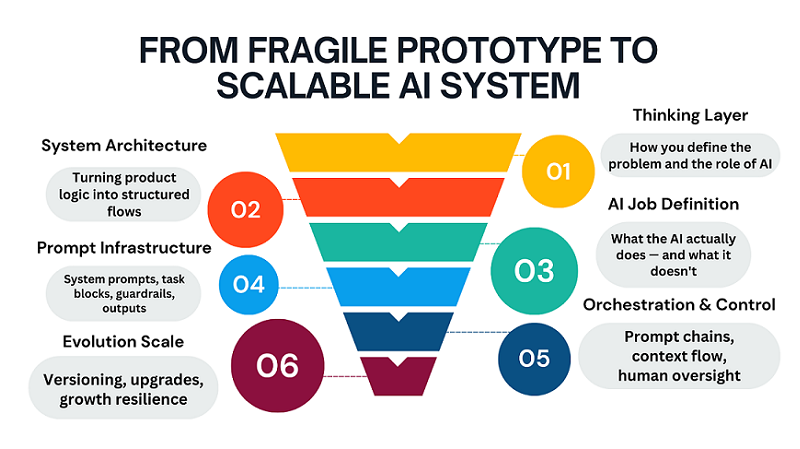
Over the past two years, thousands of people have attempted to create no-code AI products. Most were able to build a prototype, implement a model, and even get their first users. But almost all of them hit the same ceiling: the product stopped scaling; it wasn’t the code that started breaking, but the logic.

The problem is that no-code and AI are often perceived as a “shortcut” instead of a systematic approach. People think that if you replace code with tools, then the programming mindset is no longer necessary. In practice, the opposite is true: the absence of code requires an even more rigorous architecture at the thinking level.

ChatGPT is often misused in this process. It’s perceived as a smart chat, a text generator, or a task-oriented assistant. In this format, it will never become the foundation of a scalable product—at most, a convenient feature.

This article isn’t about tools or yet another stack. It’s about how to think about an AI product, where ChatGPT acts not as a service, but as a system layer through which logic, decisions, and the user experience flow.

If you want to build a no-code AI product that can handle user growth, scenario complexity, and real-world workloads, this is the level to start at.

1. Why Most No-Code AI Products Don’t Scale

Most no-code AI products don’t break when they reach a large number of users. They break much earlier—when the product needs to do more than just one simple function. This is where architectural flaws, disguised as “tool limitations,” emerge.

The typical scenario goes like this: everything works at first, users are happy, and the requests are simple. Then edge cases emerge, new scenarios emerge, different user types emerge, and decisions need to be made. And suddenly, the product doesn’t understand itself.

People start adding workarounds: new prompts, additional steps, more automation. But each such patch increases chaos rather than solving the root problem. The product becomes fragile, unpredictable, and difficult to maintain.

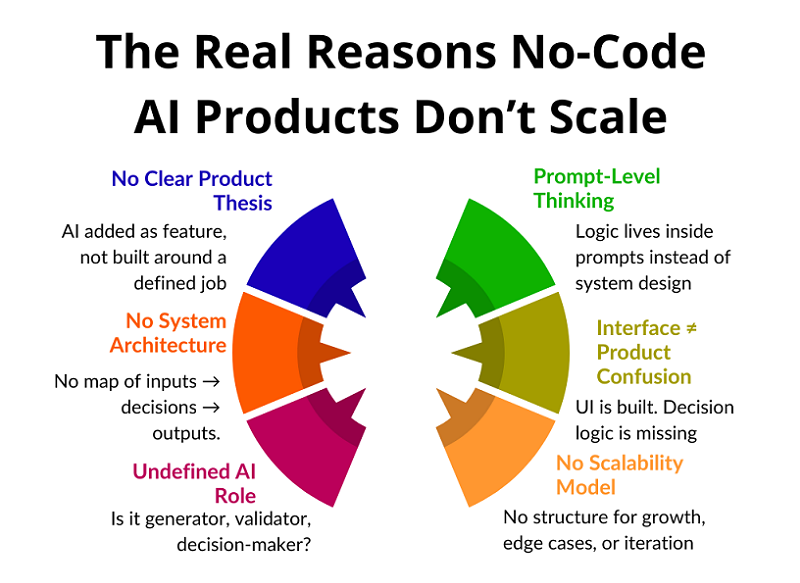
It’s important to understand the key thing: scaling isn’t about load, but about structure. If the product’s logic isn’t formalized, no amount of AI will save it. And that’s precisely why most no-code AI projects never achieve sustainable growth.

Why Products Break

Most no-code AI products don’t “die” abruptly. They fail gradually, almost unnoticed by the creator. First, strange responses appear, then inconsistent behavior, and then users simply stop trusting the product, even if it formally continues to function.

The key cause of failure is the discrepancy between expectations and the product’s behavior. The user begins to perceive the product as a system capable of understanding context and goals. But the product, in essence, remains a set of isolated reactions. This creates a feeling of instability and unpredictability.

In the early stages, such problems are masked. A small number of users, simple scenarios, and manual intervention create the illusion that everything is under control. But as the load increases, each new scenario intensifies chaos because the product lacks a centralized decision-making center.

Products fail not because of growth, but because growth reveals a lack of architecture. AI begins to respond “incorrectly” because it has nothing to guide it beyond the local request. There are no rules, no priorities, no system-level memory.

As a result, the product becomes unreliable. The user doesn’t know what to expect next, and the creator can’t explain why the product behaved the way it did. At this point, scaling becomes impossible—not technically, but conceptually.

If this pattern feels familiar, it’s not accidental. Most AI products fail long before technical scaling becomes an issue — not because of models or APIs, but because of structural thinking mistakes.

We break this down in detail in Why Most AI Products Fail Before Reaching Real Users, where we analyze the recurring product-level errors that prevent AI services from becoming stable, trusted systems.

Where People Get Stuck

The main bottleneck arises when the product needs to start behaving like a system, not a reactive script. As long as the user asks simple questions, the AI can successfully respond, even if there’s chaos under the hood. But as soon as it needs to take into account context, interaction history, user goals, or the state of the product, everything begins to fall apart.

At this point, it becomes clear that the product doesn’t “think.” It simply reacts. It has no model of the world, no understanding of why the user is there, or what should happen next. Each request is processed in isolation, as if the previous steps didn’t exist.

Instead of a system, a set of disjointed reactions emerges. One prompt is responsible for one thing, another for another, with no connections between them. The logic isn’t formalized, and the product’s behavior becomes random. Sometimes the result is good, sometimes it’s strange, and no one can explain exactly why.

When the user base is small, this may seem like “normal AI error.” But as the number of users grows, such products lose credibility. Users expect predictability and consistency, but instead receive a chaotic experience. This is where most no-code AI products hit a ceiling that’s impossible to break without restructuring their thinking.

Why the Problem Isn’t in the Tools

When a product starts to break, the first reaction is to blame the tools. People point to limitations, APIs, model quality, or the platform’s lack of maturity. This is psychologically convenient because it removes responsibility from the product’s architecture.

But tools almost always do exactly what they’re told. If the result is unstable, it means the problem statement is unstable. If the responses are unpredictable, it means the product hasn’t defined clear behavioral boundaries. AI can’t compensate for the lack of structure.

Modern no-code and AI platforms are already powerful enough to implement complex scenarios. They don’t limit thinking—they expose it. All the logical holes previously hidden behind code come to the surface.

Without architecture, even the most flexible stack devolves into chaos. Adding new elements only increases entropy. The problem isn’t the tools, but that the product wasn’t designed as a system from the start.

Lack of Systems Thinking

The main reason for failure is the lack of systems thinking at the product level. Most people think in terms of interfaces, screens, and individual features. This works for simple SaaS, but in AI products, this approach quickly breaks down.

An AI product isn’t a set of screens, but a chain of processes. It has input data, interpretation rules, decision points, and an expected outcome. If these elements aren’t explicitly described, the product begins to guess instead of work.

The key question that almost no one asks is: how does a product make decisions? Not what it answers, but why it chooses this particular scenario. If you can’t explain this, then the decisions aren’t built in.

Guessing might work at first, but it doesn’t scale. As users grow, the number of scenarios grows, and with it, chaos. Without systems thinking, an AI product inevitably becomes unpredictable and fragile.

2. ChatGPT Is Not a Tool. It’s a System Layer

The key mistake most AI products make is treating ChatGPT as a tool. They invoke the tool, get a result, and move on. The system layer works differently: all product logic flows through it.

When ChatGPT is used as a layer, it ceases to be a “chat tool.” It becomes an intermediary between input data, business logic, and user output. This is where codeless scalability becomes possible.

ChatGPT handles roles, rules, and contexts very well. But only if you think in terms of functions, not requests. A single prompt is not an architecture. Architecture begins where there is a separation of concerns.

It’s also important to understand the difference between generation and decision making. Most products use AI for text generation, but rarely use it for logic. And it’s logic that determines scale.

When ChatGPT is built as a system layer, the product becomes flexible. Adding new scenarios doesn’t break old ones. Behavior becomes predictable, and development is manageable.

This is the fundamental difference between a scalable AI product and a set of automations.

ChatGPT as Product Logic

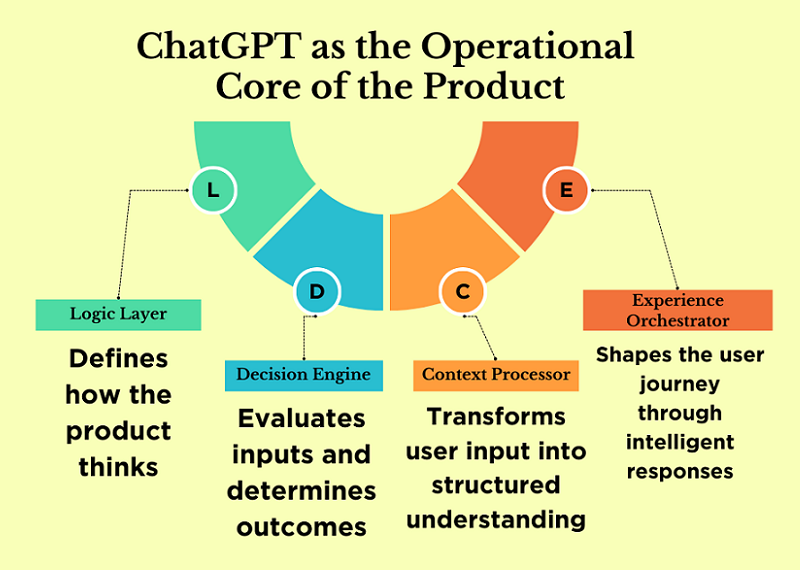
When ChatGPT is used as product logic, it ceases to be a response generator. In this role, it is responsible for the product’s behavioral rules: what is acceptable, what is not, what steps are possible, and in what order they should occur.

This is the interpretation layer, not the generation layer. The model doesn’t simply output text; it interprets input data according to defined principles. Essentially, ChatGPT becomes the carrier of the product’s business logic.

The product ceases to be rigidly coded. Fixed scenarios are replaced by rules that can be expanded and refined. This allows for the addition of new features without rewriting the entire logic.

It is at this level that codeless scalability emerges. When logic is moved to the system layer, the product can grow in complexity without losing manageability.

ChatGPT as a Decision Engine

A decision engine is a component that determines what to do next: which scenario to choose, which step is logical in the current context, which action will bring the most value to the user.

Most no-code AI products simply lack this layer. All decisions are hardcoded into prompts or delegated to the user. As a result, the product doesn’t manage the process—it merely reacts.

ChatGPT is ideal as a decision engine because it can handle context, conditions, and priorities. But only if decisions are formalized. The model must understand which factors are important and how to weigh them.

The decision engine is the heart of the product. Without it, neither scalability nor predictability is possible. It is the absence of this layer that often limits the growth of no-code AI projects.

ChatGPT as a UX Layer

User experience isn’t a design or an interface. It’s how a product interacts with the user over time. In AI-powered products, UX is defined by dialogue logic, reactions, and contextual adaptation.

When ChatGPT is used as a UX layer, it manages this interaction. It adapts product behavior to the user’s level, their goals, and their current stage. Meanwhile, the product’s structure can remain unchanged.

This approach allows for personalized experiences without complicating the architecture. The same product feels different to different users, but remains manageable internally.

When UX is integrated into the AI layer, personalization becomes the standard, not the exception. This provides a significant advantage during growth and makes the product resilient to increasing complexity.

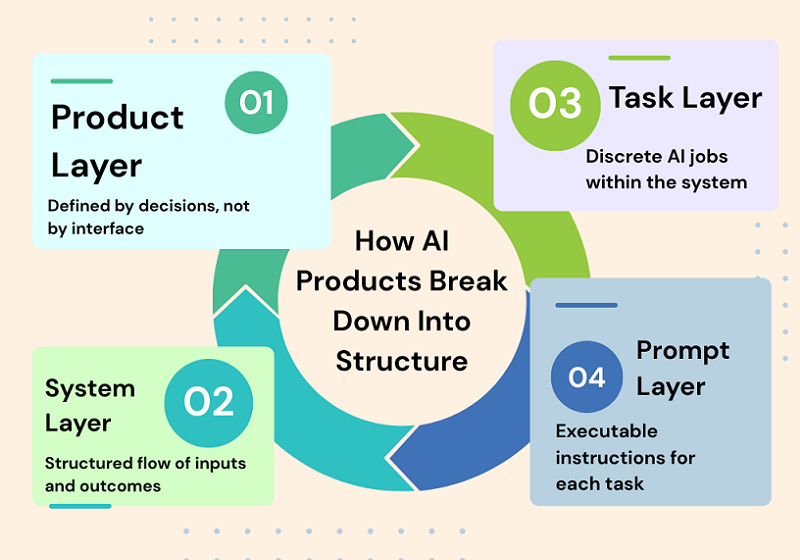
3. The Core Mental Model: From Product → Systems → Tasks → Prompts

Most no-code AI products fail not because of bad prompts or weak models, but because of a faulty mental model. People start with the interface, then move on to individual screens, buttons, and automations, and only at the very end do they consider the logic. This approach doesn’t work in AI products. It’s important to start not with how the product looks, but with how it makes decisions.

An AI product isn’t a UI or a set of features. It’s a chain of decisions that is triggered by input data, processed through context and rules, and culminates in a meaningful outcome. If this chain isn’t described, no amount of prompts will save it. That’s why scalable AI products are always designed top-down: from the system to the tasks, and only then to specific prompts.

Product ≠ Interface

One of the most common mistakes is to assume that the product is equal to the interface. A screen, an input form, or a “Generate” button create the impression of a product, but they are not a product in themselves. The user comes not for the interface, but for the result: a decision, a recommendation, an action, or a response.

In an AI product, the interface is merely a way to convey context and obtain an output. All the value lies between these points. If you remove the UI and the product ceases to exist, then the product never existed.

Strong AI products can be described without a single screenshot: through the decisions they make and in what order. The interface can be changed, simplified, or completely redesigned, but the product logic must remain stable.

This shift — from interface thinking to behavioral thinking — is what separates experimental AI projects from real products. In AI systems, UX doesn’t start with screens; it starts with decision logic, context handling, and predictable behavior.

If you want a deeper breakdown of how UX and system architecture merge in AI products, read our detailed guide on Designing and Building AI Products and Services — From UX to System Architecture.

It explores how user experience, context design, and system structure must be treated as a unified layer — especially in no-code AI environments.

Product as a chain of decisions

It’s more accurate to think of a product as a sequence of decisions rather than a set of features. At each step, the system answers a specific question: what’s important now, what should be ignored, what’s the logical next step.

For example, an AI assistant doesn’t “answer a request,” but first determines the type of task, then evaluates the user’s context, then chooses a response strategy, and only then generates a conclusion.

If these steps aren’t explicitly described, the model begins to guess. While this seems acceptable when the user base is small, as the system grows, it becomes unstable and unpredictable.

Scalability emerges when each decision in the chain can be explained, repeated, and modified if necessary.

Decomposition of an AI product: input → processing → context → output

Any AI product, regardless of complexity, can be decomposed into four basic blocks. The first is input: what exactly the user transmits to the system and in what form. The second is processing: what rules, filters, and checks are applied before accessing the model.

The third block is context. This is the most underestimated part, where the user’s history, goals, product constraints, and business rules are stored. Without context, the model operates blindly. And only the fourth block is output: response format, tone, structure, and constraints. When these blocks are separated, the product becomes manageable. Individual parts can be improved without disrupting the entire system.

This decomposition makes it possible to build complex AI products without code, but with a clear architecture.

4. Defining the AI Job (Before Any Prompting)

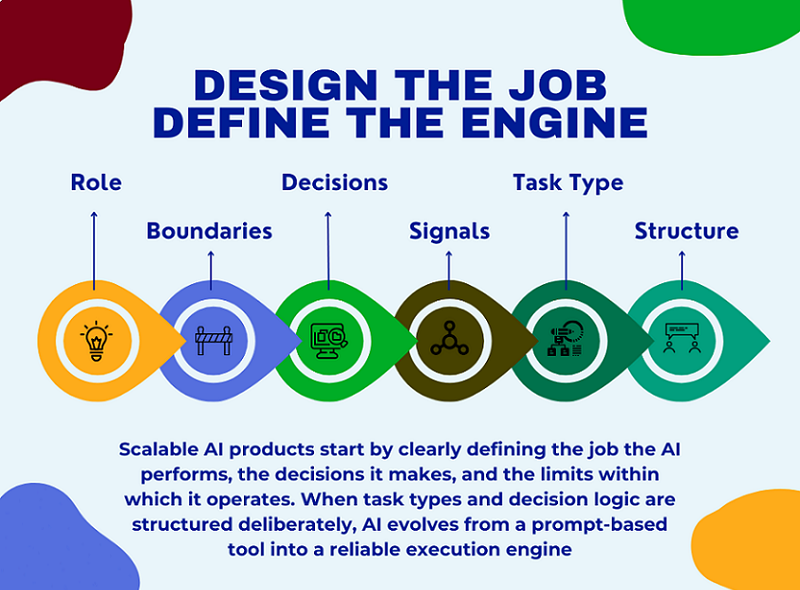
Before writing the first prompt, you need to answer the key question: what work does the AI do for the user? Not “what does it generate,” but what problem does it solve and what decisions does it make instead of humans?

Most no-code projects skip this step and immediately move on to experimenting with prompts. The result is a set of answers that lack logic and predictability.

Defining the AI job is the foundation of the product. If you can’t describe it in one or two sentences, the product isn’t ready for implementation. This step saves dozens of hours of rework and scaling down the road.

This is exactly where most founders get stuck — not because they can’t build, but because they start building without a validated direction.

Before defining prompts, flows, or system rules, there must be clarity around the problem itself. A scalable AI product doesn’t start with automation; it starts with a clear, narrow SaaS idea that solves a painful, repeatable problem for a specific user group.

Many no-code AI projects fail not due to poor execution, but because the initial idea was too abstract, too broad, or disconnected from real user demand. Without pressure from a real market, even the most elegant system architecture ends up solving the wrong problem.

If you’re still exploring where strong SaaS ideas actually come from — and how to quickly filter signal from noise — I’ve shared the exact process I use in this free lesson: Day 1 — Where to Find Great SaaS Ideas (and how to vet them)

The focus is not on brainstorming, but on identifying problems worth building systems around, before any prompts, tools, or automation come into play.

If you’re still at the idea stage and need a practical walkthrough from defining the concept to launching with first users, read our guide: How to Build an AI Product Step by Step — From Idea to First Users (No Code). It breaks down the entire path from idea clarity to real-world validation without requiring technical skills.

What exactly does AI do for the user?

AI shouldn’t be a “smart conversationalist” or a “universal assistant.” It should have a clear role. For example, analyzing data, helping with decision-making, structuring information, or automating routine tasks.

The more precisely the AI’s role is defined, the more stable the product will be. The user should understand what they’re paying for and what results they’ll get.

It’s also important to define boundaries: what the AI always does and what it never does. These limitations build trust and facilitate scaling.

A good AI job sounds like a job description, not a marketing slogan.

What decisions does AI make independently?

The next level is decisions. It’s important to clearly define where the AI makes decisions independently and where it simply executes instructions. This could be scenario selection, information prioritization, or determining the next step.

If the AI doesn’t make decisions but only reacts, the product quickly hits a ceiling. It can’t adapt to complex cases and non-standard users.

Decisions must be formalized: what signals are used to make them and what options are acceptable.

This approach transforms AI from a text generator into a decision engine that delivers real business value.

Task types: generation, transformation, analysis, classification

All AI tasks can be reduced to a few basic types. Generation is the creation of new content from scratch. Transformation is the modification or improvement of existing data. Analysis is the extraction of meaning, conclusions, and insights.

Classification is the distribution of information into categories or scenarios.

It’s important not to mix these types in the same step. When a single prompt tries to do everything at once, the result becomes unstable.

Separating tasks by type simplifies the architecture and makes the product predictable. This is especially critical for no-code solutions, where logic is more important than tools.

5. Turning a Product Into Prompt Blocks

Once the AI Job is defined, you can move on to the next step: transforming the product into prompt blocks. And this is where what distinguishes a scalable AI product from a collection of tooltips begins.

Most projects use one big prompt and hope it will solve everything. In practice, this leads to instability, errors, and the inability to further develop the product.

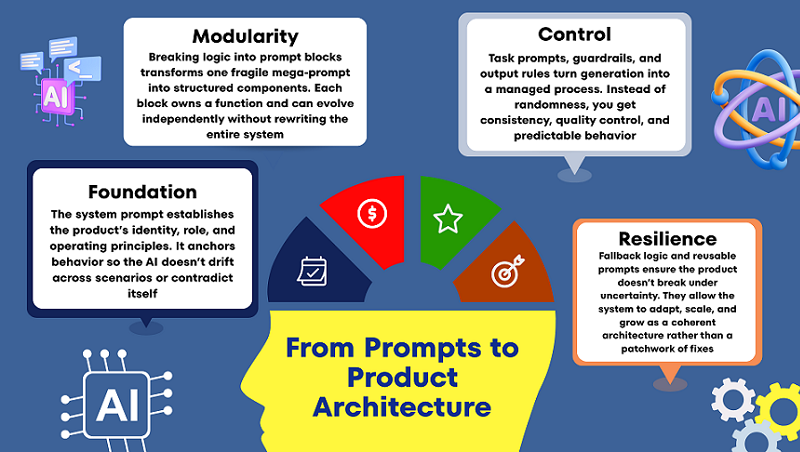
Prompt blocks are a way to break down product logic into manageable parts. Each block is responsible for its own function and can be modified independently.

This approach allows you to update the product without rewriting the entire logic. This is especially important as users grow and new scenarios emerge.

It’s important to understand: prompt blocks are not about text, but about structure. They reflect how the product thinks, not what it writes.

This is where the no-code approach truly shines: you work with logic and rules, not code and architecture.

The system prompt as a product foundation

The system prompt defines the basic rules of AI behavior. This isn’t a “be an expert” instruction, but a description of the system’s role, boundaries, and operating principles.

It answers questions such as what is acceptable and what is unacceptable, and how the product interacts with the user. Without this, the AI begins to “float” between scenarios.

A good system prompt rarely changes. It reflects the product’s philosophy and positioning.

If the system prompt isn’t defined, each task prompt begins to pull the product in its own direction. Ultimately, the logic falls apart.

Task prompts, guardrails, and output rules

A task prompt is responsible for a specific task at a specific moment. It is always shorter and more focused than a system prompt.

Guardrails are used to restrict AI behavior: what it shouldn’t do, what errors are unacceptable, what formats are prohibited.

Output rules determine the appearance of the output, not its contents. This reduces variability and improves quality. Together, these elements transform generation into a controlled process, not a lottery.

Fallback Logic and Reusable Prompts

Even the best system makes mistakes sometimes. Therefore, a scalable product always includes fallback logic: what to do if the AI is unsure or the context is insufficient.

This could be a clarifying question, a simplified scenario, or a safe default response. The main thing is that the product shouldn’t break.

Reusable prompts allow the same logic blocks to be used in different parts of the product. This speeds up development and reduces errors.

When prompts become reusable, the product begins to grow as a system, not as a set of workarounds.

6. Designing Prompt Chains That Don’t Break at Scale

In the early stages, almost any AI product relies on a single, large prompt. This seems convenient: everything is in one place, fast, and without unnecessary structure. But this is precisely where future failures occur.

One long prompt may work for a dozen users, but as it grows, it becomes fragile, unpredictable, and practically unmanageable. Any change breaks something else.

Prompt chains are a way to turn generation into a process. Instead of a single “magic prompt,” the product begins to think in steps. Each step solves its own problem and passes the result on.

This approach reduces complexity, simplifies debugging, and allows the system to scale without rewriting everything from scratch.

It’s important to understand: prompt chains are not a technical optimization, but a product optimization. They reflect how the product makes decisions.

When prompt chains are designed correctly, the AI becomes predictable and reliable, even as the workload and number of users grows.

In this section, we’ll look at why chains always win over single prompts and how to build them so they don’t fall apart over time.

Single Prompt vs. Chained Processes: What’s the Real Difference?

A single prompt tries to handle everything at once: understand the context, make a decision, and return a result. This overloads the model and increases the likelihood of errors.

In a chained process, each prompt performs a single role: analyze, clarify, make a decision, or generate a response. This reduces the cognitive load on the system.

The main advantage of chained processes is manageability. You can improve one step without affecting the others. This approach makes the product flexible: adding new logic doesn’t require rewriting everything.

To the user, it feels like a “smart product,” not like a chat with good answers. Chained processes allow the AI to guide the user, rather than simply react to requests.

Why long prompts break with growth

A long prompt is a hidden monolith. It’s difficult to read, hard to update, and almost impossible to test. When new conditions are added, it becomes inconsistent: some instructions begin to conflict with others. The model begins to “guess” which rules are more important, and response quality becomes unstable.

As users grow, this becomes especially pronounced: identical queries yield different results. Breaking the prompt into chains allows you to clearly define priorities and the order of actions. This reduces the number of unexpected responses and simplifies quality control.

Conveying context and reducing errors in flowcharts

Context isn’t just a message history. It’s the user’s goal, the current state of the task, and the product’s limitations.

In flowcharts, context is conveyed deliberately: each step receives only what it needs. This reduces noise and reduces the likelihood of hallucinations. Errors are easier to localize: if something goes wrong, you know which step.

Additional checks between steps allow you to filter out weak or incomplete results. As a result, the product becomes resilient even in complex use cases.

7. Human-in-the-Loop Without Killing Automation

Full automation is a beautiful idea, but it rarely works 100% in real AI products, especially during the growth phase. Attempts to completely remove humans often lead to a drop in quality and a loss of user trust.

Human-in-the-loop isn’t a sign of system weakness, but rather a sign of product maturity. The goal isn’t to “check everything,” but to intervene where it’s truly needed. A properly integrated human enhances automation, not hinders it.

Human verification helps the system learn, adjust, and remain reliable in challenging situations.

In this section, we’ll discuss how to integrate manual verification so that the product remains scalable. We’ll also discuss why quality is a product strategy, not a technical metric.

Where manual verification is truly necessary

Human verification is needed where errors are costly: legal formulations, finances, and reputational risks. Manual verification is also important in new or rare scenarios where data is still scarce.

In the early stages, this helps quickly identify system failures.

It’s important that verification be targeted, not comprehensive. Otherwise, the product becomes a high-cost semi-automated system. Manual verification should enhance the system, not replace it.

Where automation should work without human intervention

Repetitive, standardized tasks are ideal for full automation.

If the scenario is stable and well-defined, human intervention only slows down the process. Here, it’s important to trust the system and measure overall quality, not individual errors.

Automation should resolve 80–90% of typical cases. This creates a sense of speed and reliability for the user. Human intervention is only necessary in exceptional cases.

Quality, Hallucinations, and Product Trust

Hallucinations aren’t a model bug, but a consequence of poor product logic. They most often occur when AI is forced to respond without sufficient context or constraints.

Human-in-the-loop technology allows us to detect such cases and adjust the system accordingly.

But even more important is to design the product so that AI can honestly say, “I’m not sure.” This paradoxically increases user trust. A high-quality AI product isn’t one that always responds, but one that knows when not to respond.

8. Making the AI System Upgradeable (Very Important)

Most AI products look good at the start, but start to fall apart with the first changes. If you need to change the logic, everything breaks. If you need to improve the quality, you have to rewrite half the system. This happens because the product was initially designed as one big prompt, not as an upgradable system.

An upgradable AI product is one where change is not a concern. You can strengthen the logic, change behavior, add constraints, and improve the result without rewriting everything from scratch. This approach is especially important for no-code projects, where the cost of error is higher and technical debt is not visible until the very last moment. In this section, we’ll explore how to think about an AI system so that it lives and evolves alongside the product.

Decoupling Logic From Prompts

The biggest mistake is storing all the logic within a single prompt. When logic is mixed with text, any change becomes risky. An upgradable system takes rules, steps, and conditions outside the wording.

A prompt should execute logic, not contain it entirely. This way, you can change behavior without rewriting instructions. This reduces bugs and speeds up iterations. As a result, the product becomes manageable, not brittle.

Prompt Versioning as a Product Primitive

Versioning isn’t about accuracy, but about product survival. Without versions, you don’t know what exactly improved or worsened the result. Every logic change should have its own version and purpose. This allows for rollbacks, comparisons, and hypothesis testing.

Versioning transforms chaotic edits into managed development. Even without code, you can build a simple yet reliable versioning system. This way, an AI product begins to evolve, not degrade.

Scaling Users Without Scaling Chaos

User growth always exacerbates a system’s weaknesses. What worked for 10 users breaks down for 100. An upgradable AI system anticipates increased load and a variety of scenarios. This means clear constraints, fallback logic, and predictable outputs.

It’s important for the system to behave reliably even with erroneous input data. This is where
most no-code products begin to fail. A good architecture scales more smoothly than it seems.

Why Most AI Products Break at This Stage

Most products fail not because of the model, but because of the structure. Founders try to “improve the answers” instead of improving the system. Every change increases complexity and reduces control. At some point, no one understands how the product works. This is the point where development stalls.

Upgradeable thinking prevents this scenario from happening. It transforms AI from a hack into a long-term asset.

9. Real Examples: From Prompt → Micro SaaS Feature

Abstract concepts are useful, but real-world examples best demonstrate the product’s thinking. It’s important to understand: a Micro SaaS feature isn’t “AI that writes something.” It’s a limited, repeatable value for a specific user.

In all the examples below, AI is just one layer within the system. We won’t discuss specific tools or platforms. The focus is on the logic, structure, and product presentation. This is how a prompt becomes a commercial feature.

From Text Generation to a Writing Workflow

AI writers as a product aren’t just text generation on demand. It’s a controlled process with a goal, style, and constraints. The user doesn’t receive “options,” but a result tailored to their task.

The system knows what to write, why, and in what format. Context and rules are more important than wording. Thus, AI becomes part of the workflow. This is a Micro SaaS feature, not a demo model.

Turning Analysis Into a Decision Engine

An AI analyzer isn’t just about analyzing input data. Value emerges when the system makes conclusions and recommendations. The user pays for time savings and clarity. A good feature hides complexity but preserves logic. Analysis is always tied to context and purpose. The output is an action, not a report. This is how AI begins to influence business decisions.

Building an Assistant That Knows Its Role

An AI assistant breaks down when it tries to be “everyone.” A product assistant always has a clear role. It knows what it can and cannot do. It remembers the state of the process and the next step. Such an assistant doesn’t just chatter—it helps. The role constrains the model and amplifies the result. This turns the assistant into a valuable feature, not a toy.

10. Common Mistakes Non-Technical Founders Make

Almost all mistakes in AI products appear technical, but they are actually product-related.

Founders without a technical background rarely make mistakes due to a lack of code—they make mistakes due to a lack of structured thinking. AI appears “smart,” which creates the illusion that it will figure out how to work correctly. As a result, the product is assembled as a set of chaotic solutions that only work under ideal conditions.

It’s important to understand: these mistakes are not made by newbies, but by smart, motivated people. They simply think in terms of tools, not systems. Below are the most common patterns that prevent an AI product from reaching real users and achieving stable growth.

The “One Big Prompt” by Fallacy

One huge prompt seems like a simple and quick solution. At first, it can actually produce good results. But the more logic you cram into it, the less manageable it becomes. Any change starts to break behavior in unexpected places. You lose track of why the product works the way it does. A large prompt is impossible to scale and improve systemically. Ultimately, it becomes a single point of failure for the entire product.

Believing One Model Can Do Everything

The idea that “one model can solve everything” sounds tempting. But in real-world products, the tasks are too diverse in nature.

Decision generation, analysis, and decision making require different approaches. When everything is mixed in a single request, quality deteriorates unnoticeably. The model begins to guess instead of acting logically.

The product loses predictability and user trust. Good AI systems separate roles, rather than relying on magic.

Building Without a Systemic Structure

Lack of structure is the most costly mistake. The product is built around screens, not logic. There’s no clear understanding of input, processing, and output. Each new feature is added on top of the old, not within the system. Over time, the product becomes fragile and complex. Fixes begin to cost more than the initial build. Without structure, an AI product doesn’t last long.

Ignoring Constraints and Guardrails

Many founders are afraid to limit AI. It seems that limitations reduce the product’s intelligence. In fact, it’s the opposite: limitations create reliability. Without guardrails, AI begins to behave unpredictably. Errors don’t appear immediately, but as users grow. Users see chaos where they expected stability. A good product always knows what it shouldn’t do.

Final Thoughts: AI Products Are Built With Thinking, Not Code

AI products win not through technology, but through thinking. Code is now accessible to everyone, and models are becoming cheaper and more powerful every month.

Real advantage emerges where there is clarity, structure, and focus. A product is not an interface or a prompt, but a decision system. When you start thinking about AI as a logical layer, everything changes. You stop chasing “better answers” and start building controlled behavior. That’s when predictability, quality, and scalability begin to appear.

Long-term AI products aren’t built over a weekend. But they also don’t require large teams or complex code. They require disciplined thinking and a product-first approach. This is especially important in a no-code environment, where architectural mistakes are invisible at first — and expensive later.

For a solo founder, this isn’t a limitation, but an advantage. You can design your system intentionally, without unnecessary complexity. You move faster, iterate faster, and learn faster. AI amplifies founders who think in systems.

But architecture alone isn’t enough. A scalable system only matters when it’s tested in the real world with real users. Once your AI logic is structured and your product thinking is clear, the next step is execution and validation.

If you’re ready to move from system design to real-world traction, follow our step-by-step guide on how to launch an AI SaaS and get your first users in 30 days.