
why-most-ai-products-fail

Why Most AI Products Fail Before Reaching Real Users

Today, creating an AI product is technically easier than ever. Models are readily available, no-code tools lower the barrier to entry, and examples of successful launches are constantly appearing in the news feed. But the paradox is that most AI products never reach real users. They don’t fail because of bad code or a weak model—they fail much earlier.

Most often, the problem lies in the founder’s mindset and how they understand the word “product.” Many launch a demo, wrap it in a beautiful interface, and call it a service. The first tests go well, friends say “wow,” but then something goes wrong. Users don’t return, the scenarios break, and any improvements turn into chaotic prompt edits. It feels like “the AI is acting weird,” when in fact, it’s the system itself that’s acting weird.

In this article, we’ll explore why AI products don’t reach the point of real use, where exactly they break down, and what mistakes are repeated over and over again. Without technical jargon, we’ll use product logic.

This article isn’t about models or tools. It’s about why good ideas don’t become products, and how to distinguish a temporary demo from a trustworthy system.

If you’re building an AI service, micro-SaaS, or a no-code product, you’ll almost certainly recognize yourself here. And that’s good: it means the problem can still be fixed.
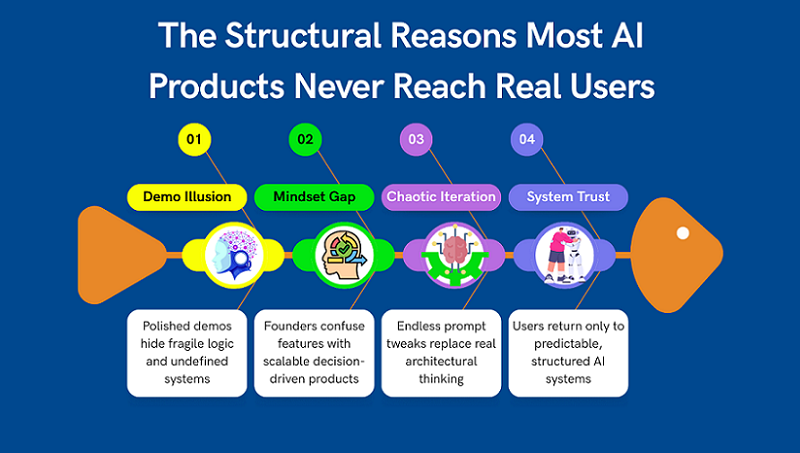
1. Mistaking a Demo for a Product

Most AI projects fail not at the scaling stage, but much earlier—when a demo is mistaken for a product. A demo demonstrates what the model can do, but the product is responsible for delivering consistent user experiences. These are fundamentally different things, yet they are often confused.

In a demo, everything works under ideal conditions: one scenario, one type of request, minimal context. In reality, users act chaotically, ask questions incorrectly, and expect predictable results.

When there’s no system in place, any deviation from the “ideal case” begins to break the product. And instead of scaling, the founder begins endlessly fixing prompts.

The problem is compounded by the fact that a demo is easy to sell to oneself. It looks smart, provides attractive answers, and creates the illusion of readiness. But it’s precisely this illusion that most often kills a product.

In this section, we’ll explore the line between a demo and a product and why it’s so important to recognize it as early as possible.

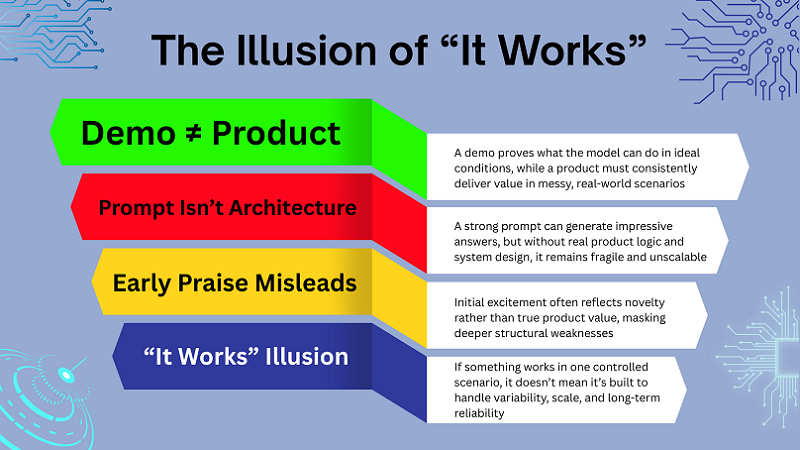
A Prompt Is Not a Product

One of the most common mistakes is thinking that a good prompt is already a product. Yes, a well-thought-out prompt can provide impressive answers, especially at the start. But at its core, it’s just an instruction for a model, not product logic.

A prompt doesn’t make decisions, doesn’t manage context, and doesn’t understand the user’s goal. It simply reacts to input. As soon as the scenario becomes more complex, the prompt begins to crumble.

A real product knows what it does, why it does it, and what state the user is in. If everything rests on one big prompt, the system becomes fragile and unpredictable. This is why products built solely on prompts don’t scale well and require constant manual intervention. This isn’t architecture—it’s a temporary construct.

Why Early Praise Is Misleading

Almost every AI founder has encountered this: early users say the product is “really cool.” It’s nice, but dangerous. Early feedback often evaluates the quality of responses rather than the product’s value.

People are impressed that the AI understands anything at all and responds coherently. But that doesn’t mean they’re ready to use the product regularly or pay for it.

This kind of feedback rarely reveals where the system breaks down in real-world use. It doesn’t identify problems with logic, context, or repeatability.

As a result, the founder begins to optimize what they already like and ignores structural weaknesses. These only surface later, when fixing them becomes expensive.

When “It Works” Actually Means “It Breaks Later”

In AI products, the phrase “everything works for me” almost always means “it works in one scenario.” This is the most dangerous point, as it creates a false sense of readiness.

As soon as new user types, different goals, or non-standard requests appear, the system begins to behave unpredictably. Responses contradict each other, logic is lost, and trust declines.

The problem isn’t with the model or the API. The problem is that the product wasn’t designed to handle variability.

Scaling in this case doesn’t break the product—it simply reveals the errors inherent in the very beginning. And that’s why it’s so important to distinguish between “it works now” and “it could work stably.”
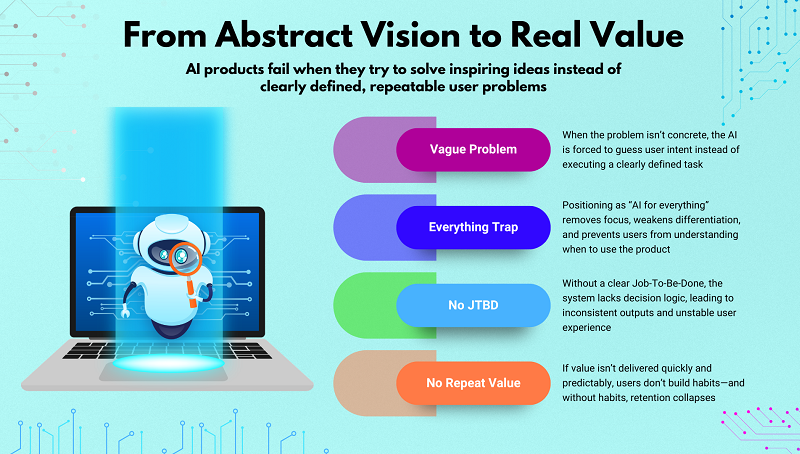
2. Solving Abstract Ideas Instead of Concrete Problems

One of the key reasons AI products fail to reach real users is the attempt to solve an abstract idea instead of a concrete task. Founders often start with an inspiring description but not a clear problem statement. Under these conditions, the AI is forced to “guess” what is expected of it rather than perform a specific task.

At the start, this may seem normal, especially if the initial model responses are impressive. But as usage increases, inconsistencies, contradictions, and instability begin to emerge. The user perceives this as a “raw” product, even if they can’t explain why.

Abstract formulations don’t provide the system with a basis for decision-making. As a result, the product doesn’t scale and doesn’t become part of the user’s daily workflow. This is where many AI projects lose their chance to move from experimentation to production.

“AI That Helps With Everything” Trap

The promise of “AI that helps with everything” almost always works against the product. The user doesn’t understand the specific scenario in which the service will be useful. Without a clear focus, the product doesn’t set expectations and doesn’t reinforce behavior.

Such solutions often turn into a one-size-fits-all chat that “can do everything” but doesn’t solve anything well enough.

The user tries it a couple of times and never returns because they don’t see any specific value.

Broad positioning also complicates product development: each new improvement pulls it in a different direction. As a result, the team loses focus, and the system loses stability.

No Clear Job-To-Be-Done

When it’s unclear what work AI performs for the user, the product begins to break down internally. The system doesn’t understand which decisions are a priority and which are secondary. This leads to inconsistent results and unstable behavior.

A clear Job-To-Be-Done defines the framework for logic, context, and UX. Without it, each request becomes a separate experiment. The user is forced to constantly clarify, correct, and monitor the result.

Under such conditions, AI doesn’t reduce the workload; on the contrary, it creates additional work. This quickly destroys trust in the product.

Why Users Don’t Return

Users only return to products where value is felt quickly and repeatably. If the result is different every time, trust doesn’t develop. Even good responses don’t compensate for the lack of consistency.

An abstract task doesn’t allow for a predictable experience. Users can’t integrate the product into their workflow. As a result, the service remains “interesting,” but not essential. When value isn’t cemented into habit, the product loses users even before it reaches the growth stage. The problem here isn’t marketing, but the initial problem.

If you’re at the very beginning and still defining what problem your AI product should solve, start here:
Day 1 — Where to Find Great SaaS Ideas (and How to Vet Them) It walks through how to identify concrete, monetizable problems instead of abstract ideas — and how to validate them before building anything.
3. Building Screens Before Systems

The second common mistake is starting with the interface, not the system. Many AI products look beautiful, but lack clear logic underneath. This is especially common in no-code environments, where screens are assembled faster than product decisions are made.

Focusing on the UI creates the illusion of progress. The product seems almost ready because it has buttons, forms, and scenarios. But beneath the surface, a lack of structure lurks.

When the user begins using the product in real-world conditions, the system can’t handle the load. Errors appear suddenly and are difficult to fix without reworking the entire logic. As a result, a beautiful interface becomes a mask for a fragile product.

UI-First Thinking in No-Code Tools

No-code tools simplify interface creation, but they increase the focus on screens. Founders begin to think in terms of “page,” “form,” and “button” rather than “decision” and “logic.”

This leads to the product being designed as a set of screens rather than as a decision-making system. In this approach, AI is simply inserted into the UI, without understanding its role.

As a result, the system becomes dependent on the interface, not vice versa. Any change to the flow requires manual edits and complicates product development.

When UX Hides Broken Logic

Good design can temporarily hide problems in logic. The user feels the product is “beautiful,” but over time, they begin to notice strange behavior. Responses contradict each other, the system forgets the context, and decisions appear random.

In the early stages, this is often attributed to “AI quirks.” But the real problem is the lack of a clear structure. UX can’t compensate for a weak system.

When logic breaks down, no interface can save the user’s trust. They simply stop using the product.

Why Systems Scale, Screens Don’t

Interfaces don’t scale on their own. Only the logic behind them scales. If the system understands what to do and why, the interface can be changed painlessly.

When logic is hardwired into screens, every change becomes a risk. The product becomes fragile and poorly adapts to growth.

This is why sustainable AI products are built as systems, with the interface merely as a way to interact with them. This is the fundamental difference between a demo and a real product.

If you’re trying to understand what it actually means to build AI as a system — not just a set of prompts behind a UI — this is explored in depth in How to Build Scalable AI Products Without Code (Using ChatGPT as the Core Layer).

It breaks down how to structure decision logic, context layers, and product architecture so the system stays stable even as usage grows.

4. Ignoring Context as a Core Product Layer

One of the most underestimated reasons for the failure of AI products is ignoring context as a fully-fledged product layer. Many founders consider context to be secondary: “we’ll add memory later,” “this can be solved with a prompt.” In practice, it is context that determines whether a product feels intelligent or useless.

When AI starts from scratch every time, the product loses consistency, predictability, and trust. The user is forced to repeat the same things, clarify goals, and correct answers. This may be unnoticeable in early demos, but in real use, the problem immediately becomes apparent.

Context is not a technical detail, but product logic: what the system knows about the user, the process, and the current state of the task. Without it, AI remains a response generator, not part of the service. This is precisely why products without context rarely reach regular use. They may impress, but they don’t retain users.

Treating Every Request as Isolated

When each request is treated as a separate event, the AI loses the sense of continuity. The product doesn’t “understand” what came before and doesn’t know where to lead the user next. As a result, responses may be formally correct, but contextually useless.

The user feels like they’re interacting not with the system, but with disjointed responses. This undermines the sense of intelligence and reduces the product’s value after just a few sessions. This approach may work in tests, but quickly breaks down in a real-world scenario.

Isolated requests are a quick path to frustration because the product doesn’t evolve with the user. It simply reacts, but doesn’t support it.

What Users Expect the Product to Remember

Users don’t think in terms of “memory” or “state.” They simply expect the product to remember their goal, previous steps, and constraints. This is a basic expectation shaped by other digital services.

When AI forgets what the user has already explained or selected, a sense of chaos ensues. People have to waste time repeating themselves instead of moving forward. In SaaS products, this is perceived as poor UX, not an “AI feature.”

Context allows a product to be consistent, not just clever in its own words. This is why memory is not a feature, but a foundation.

Context Loss as a Trust Killer

Trust in an AI product is built on the feeling that the system understands the user. When context is lost, this trust vanishes instantly. Even one glitch can call the entire product into question.

The user begins to double-check answers, doubt recommendations, and spend more time than it saves. At this point, the product ceases to be a helper.

The most dangerous thing is that such glitches are perceived not as bugs, but as the product’s “stupidity.” And regaining trust after this is extremely difficult.

5. Confusing Generation With Real Value

Many AI products get stuck at the content generation level, mistaking it for the ultimate value. Texts, lists, and answers look impressive, but they don’t necessarily solve the user’s problem. This is the key mistake that prevents products from moving from interest to utility.

The user isn’t interested in the generation itself, but in the result: the decision, the choice, the next step. When a product simply “writes,” it shifts the bulk of the work onto humans. As a result, AI increases the volume of information without reducing the workload.

Real value arises when a product takes on some of the thinking. Without this, AI remains a tool, not a service. This is why generation without logic rarely leads to user retention.

Content ≠ Outcome

A well-written text doesn’t equal a solved problem. The user may receive the perfect answer but still be confused about what to do next. This creates the illusion of help without any real results.

AI founders often confuse the quality of generation with the value of a product. But in real life, it’s not the text that’s valued, but the action or decision it leads to.

If a product doesn’t lead the user to a result, it remains informational noise, albeit a beautiful one.

No Decision-Making Inside the Product

When AI doesn’t make decisions, it doesn’t take responsibility. It merely suggests options, leaving the entire cognitive load to the user. This approach quickly becomes tiring.

Product value emerges when the system itself selects, filters, and recommends. This isn’t about control, but about assistance.

Without integrated decision-making, AI remains an assistant, not a service. And assistants rarely become products worth paying for.

Why Users Feel Overloaded Instead of Helped

Paradoxically, many AI products actually make users more tired. Instead of saving time, they add new layers of choice and analysis.

When a product presents too many options without clear logic, it shifts the thinking onto humans. The user feels like they’re working in the system’s stead.

True help is simplification. If AI doesn’t do this, the product loses its meaning, even if it generates excellent solutions.

6. Avoiding Real Users for Too Long

One of the most common, yet rarely acknowledged, reasons for AI product failure is avoiding real users. Many teams spend years tinkering with a product, believing it’s not ready for release. As a result, the product exists only in the founder’s mind and in closed demos.

The problem is that without contact with reality, an AI system doesn’t receive the feedback it needs to grow. Errors go unnoticed, hypotheses go untested, and confidence in the product is built on assumptions.

This is especially dangerous for AI products, where system behavior only manifests itself in a variety of real-world scenarios. The longer the product is isolated from users, the more painful the launch moment is. And the higher the chance that users simply won’t see the value.

The “Not Ready Yet” Syndrome

The “not ready yet” syndrome seems rational, but in practice, it’s destructive. The founder convinces themselves that the logic, interface, or AI responses need some more refinement. In reality, this is often a fear of receiving negative feedback.

AI products don’t become “ready” in a vacuum. They only become sustainable through use. Every delayed release is a lost opportunity to uncover real problems.

As a result, the product either never launches or launches too late, when energy and focus have already been lost.

Building in Isolation

When a product is created without users, it develops in a closed system. All decisions are made based on assumptions, not behavior. This is especially dangerous for AI services, where the nuances of use are everything.

A founder may be confident that the product is logical and useful, but users think differently. Without real use cases, the system is optimized for an imaginary user.

As a result, upon first contact with the market, it turns out that the product solves the wrong problem or does so in an inconvenient way.

Why No-Code Doesn’t Remove This Fear

No-code lowers the technical barrier, but it doesn’t remove the psychological one. The ability to quickly build a product doesn’t mean you’re ready to share it with the world.

Many founders continue to endlessly “improve” the product, even when technical limitations are removed. The fear of evaluation remains the same.

Therefore, no-code is a tool for acceleration, but not a substitute for determination. Real progress begins only with the first users, not with the next update.

7. Scaling Before the Product Is Ready

Attempts to scale an AI product before it’s stable almost always end in failure. Growth amplifies everything: both strengths and weaknesses. If the system is unstable, scaling only accelerates decay.

Many founders begin thinking about metrics, automation, and growth without ensuring the product behaves predictably. As a result, problems that could have been fixed early on turn into systemic failures.

AI products are especially sensitive to this because their behavior depends on context, logic, and decisions. If these layers aren’t in place, growth becomes dangerous.

Premature Automation

Automating weak logic doesn’t make a product stronger—it makes problems happen faster. AI starts making mistakes more frequently, but on a larger scale.

Founders often automate processes that haven’t yet proven their resilience. As a result, the product loses flexibility and becomes more difficult to fix.

The right approach is to first ensure that the logic works in manual or semi-automated mode and only then scale.

Metrics Without Product Stability

Metrics can create the illusion of control. Increased traffic, requests, or sessions don’t mean the product is working properly.

If system behavior is unstable, the numbers only hide the real problems. Users may come, but they won’t stay.

Without robust product logic, analytics becomes noise, not a decision-making tool.

When Growth Exposes Structural Flaws

Growth doesn’t break a product—it reveals what’s already broken. Errors in logic, context, or decision-making become apparent precisely when the load increases.

What worked for ten users can completely fall apart for a hundred. And that’s okay—if you’re prepared.

The problem arises when growth starts too early, and the team doesn’t understand what exactly needs to be fixed.

Final Thoughts — AI Products Fail Because of Thinking, Not Technology

Most AI products fail to reach real users not because of models, APIs, or a lack of code. They fail much earlier — at the thinking level.

Founders confuse demos with products, generation with value, and interfaces with systems. They avoid users, fear the release, and try to scale before the product is sustainable.

AI products require a different approach: systemic, consistent, and solution-oriented, not answer-oriented.

The context, logic, and responsibility of the system are more important than any prompts or UI effects.

A real product begins when AI takes over some of the thinking, not just writing text.

This is what distinguishes a service that is used from a tool that is quickly forgotten.

Understanding these mistakes is the first step to creating a sustainable AI product.

The solutions to these mistakes are discussed in detail in the pillar article on scalable, no-code AI products.
designing-and-building-ai-products

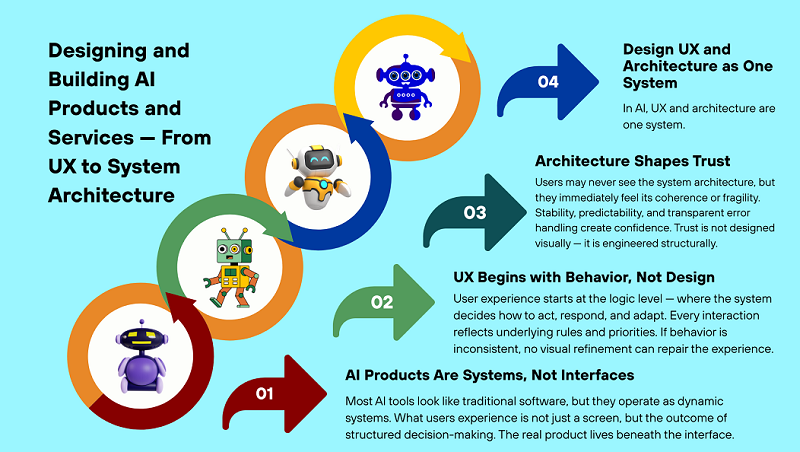
Designing and Building AI Products and Services — From UX to System Architecture

Designing and Building AI Products and Services is not about adding a model to a clean interface. It’s about creating systems that behave predictably, make decisions consistently, and deliver value beyond a single response. Many AI products look polished on the surface — they generate text, answer questions, or analyze data — but they fail to give users the feeling of interacting with a coherent system. The reason is simple: they’re designed as interfaces, not as behaviors.

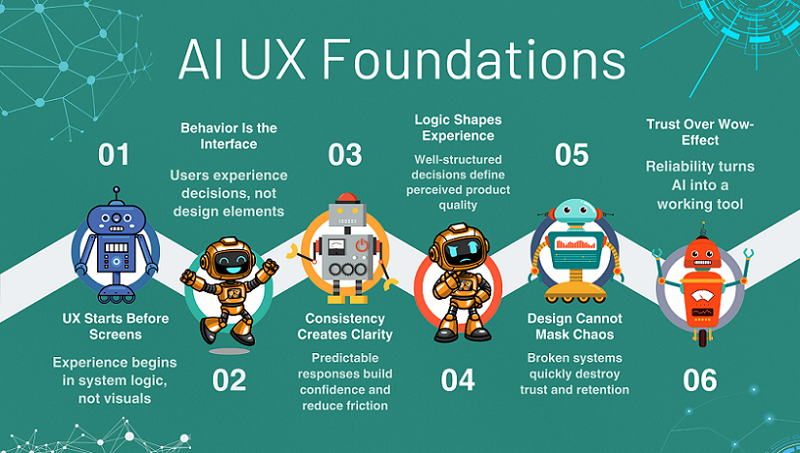
In AI products, UX begins long before the first screen or button. It’s shaped by how the system makes decisions, how it handles errors, and how it behaves in unusual scenarios. Users may never see the architecture, but they always feel its presence. This is why beautiful screens rarely save a product built on unstable logic.

In this article, we’ll explore how Designing and Building AI Products and Services requires treating UX and system architecture as a unified discipline — not at the code level, but at the level of structure, decision flows, and product behavior.

This perspective is especially critical in no-code and low-code environments, where architectural weaknesses surface quickly. We’ll examine where UX truly begins, why design alone can’t fix a broken system, and how to build AI experiences that inspire long-term trust.

1. Designing and Building AI Products and Services: Why UX Starts Before the Interface

In AI products, the user experience doesn’t begin with a login screen or dashboard. Designing and Building AI Products and Services always starts with how the system thinks, reasons, and acts before the interface ever exists. It begins with how the system thinks and acts. The user may not understand how the AI works internally, but they immediately sense chaos or structure. If the system’s behavior is unpredictable, no design will save the situation.

UX in AI is primarily about consistency, logic, and explainability. That’s why the interface is only the final layer, not the starting point. Trying to “finish the UX” after the logic has already been broken is a mistake.

In this section, we’ll explore why UX in AI is product architecture, not visual style. And why UX development should begin long before prototypes and mockups.

UX in AI Products Is System Behavior, Not Visual Design

In classic products, UX is often associated with visuals, but this thinking doesn’t apply to AI systems. Users interact not with screens, but with the system’s behavior. They experience UX in how the AI responds to input, how it interprets context, and what decisions it makes. If a system responds one way today and another tomorrow without explanation, the UX is considered poor. Even with perfect design. Good UX in AI is predictability without a sense of rigidity. It’s when the user understands what to expect from the product. Therefore, UX in AI is the result of well-designed logic, not a well-designed UI. Design merely visualizes an already-adopted system decision. If decisions are chaotic, the UX will be the same.

Why Good UX Can’t Fix a Broken AI System

A beautiful interface is often used as a mask for weak logic. This may work for the first few users, but only briefly. When the AI starts making mistakes, getting confused, or giving inconsistent answers, the UX collapses instantly. The user loses trust in the product, even if they like the design. This is because UX can’t compensate for the lack of a decision-making system. If the product doesn’t understand the user’s goal, the interface won’t save it. In AI products, UX is a consequence of the architecture, not the other way around. This is why many projects look “good” but fail to retain users. This is one of the key reasons why AI products fail to reach real users and die early on.

Designing UX for Trust, Not Wow-Effect

In AI products, the main currency isn’t the wow factor, but trust. Users may be surprised once, but they’ll only use what they trust. Wow-effect responses often look impressive, but they’re unstable. And instability ruins UX faster than anything else. Good UX in AI is when the system explains its behavior through actions, not lengthy prompts. Users should feel like the product understands their task. UX should reduce cognitive load, not add to it. This is achieved not by animations, but by the structure of solutions. When users see logic, even errors are more easily accepted. This is how UX transforms from a show into a working tool.

2. From User Actions to Product Logic

In AI products, there’s always a layer of interpretation between a user’s action and the result. This layer is often underestimated, even though Designing and Building AI Products and Services depends on how well intent is separated from interface actions.

The user clicks a button, enters text, or loads data, but the product doesn’t care about that. It’s important to understand why they’re doing it. This is where most products start to break down, because they continue to think in terms of screens and scenarios. This is acceptable in classic UX, but not in AI. An AI product must work with intent, not clicks. When logic is built around actions, the system becomes fragile and doesn’t scale well. When logic is built around meaning, the product begins to behave like a system.

This section shows how to move from superficial UX thinking to product logic. Without delving into architecture, but with a clear understanding of the system’s responsibilities. This is the foundation for predictable AI behavior. And this is where UX becomes a product.

Mapping User Intent When Designing AI Products and Services

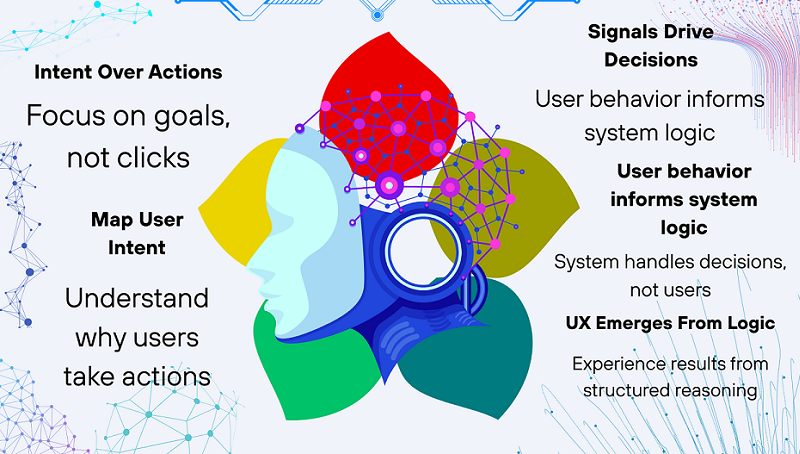
In traditional products, user flows describe the user’s journey through screens. In AI products, this approach quickly becomes unworkable. Users can reach the same goal in different ways, and the system must understand this. Therefore, instead of click flows, it’s important to model intent. Intent is not an action, but the goal behind it. When a product understands intent, it can adapt behavior without changing the interface. This makes the system flexible and resilient. In this approach, UX becomes a consequence of logic, not its source. The user feels that the product “understands” them, even if they act unconventionally. It is intent-based thinking that allows AI products to appear smarter than they actually are. And this is a direct bridge to systems thinking.

Translating UX Signals Into System Decisions

Every user action is a signal, not a command. Entering text, repeating a request, or correcting a result carries context. The task of an AI system is to correctly interpret this context. The mistake many products make is that they react to the interface rather than the meaning of what’s happening. AI shouldn’t “see a button”; it should understand the situation. When UX signals are transformed into system decisions, the product becomes alive. It begins to adjust behavior, not simply follow instructions. This reduces errors and repeated requests. The user experiences it as a smooth and logical experience. This approach prepares the product for growth without complicating the UX. And this is where architectural thinking begins, without technical overload.

Where UX Ends and System Responsibility Begins

One of the most common mistakes is shifting logic to the user. When a product requires “formulating a request correctly,” the UX is already broken. The interface should collect signals, not make decisions. Decisions are the responsibility of the system. When the boundary is blurred, the product becomes tedious and unpredictable. The user begins to adapt to the AI, not the other way around. A good AI product internalizes complexity and externalizes simplicity. UX ends where decision making begins. Everything related to interpretation, context, and action selection must be internal to the system. This is directly related to the idea that a product is a chain of decisions, not a set of functions. And this is what distinguishes a product from a tool.

3. From UX Thinking to AI Product Logic

In AI products, the user journey can’t be viewed as a series of clicks. Designing and Building AI Products and Services requires shifting from interface-driven flows to intent-driven logic. Actions are simply external signals, always based on intent. When a product responds solely to the interface, it quickly hits the limit of its logic. This is why many AI services appear smart in demos but break down in real-world use.

For a product to be robust, it must understand what the user is trying to solve, not just what they clicked. This is where UX begins to seamlessly transition into product logic. This is the point where design ceases to be visual and becomes semantic. An AI product begins to behave like a system, not a form with buttons. This approach simplifies product development without rewriting the entire UX. And this is where the foundation for codeless architectural thinking is laid.

Intent-Based Design in AI Products and Services

Traditional user flows describe the user’s journey through screens. In AI products, this approach quickly breaks down because users act nonlinearly. The same intent can be expressed in different ways. If the system doesn’t understand this, the product begins to feel “dumb.” An intent-based approach shifts the focus from the path to the goal. AI begins to address the user’s task, not their behavior in the interface. This makes the product more flexible and resilient to non-standard scenarios. The user feels understood by the system, even if their request is not perfectly formulated. This approach directly leads to systems thinking.

Translating UX Signals Into System Decisions

Every user action is a signal, not an instruction. Repeating a request, correcting a result, or pausing between actions carries meaning. The task of an AI product is to transform these signals into decisions. When a system responds only to UI events, it loses context. In strong products, AI responds to the situation, not the button. This reduces errors and increases the product’s perceived intelligence. The user doesn’t have to think about logic—they simply see that the product is behaving appropriately. This approach prepares the product for growth without complicating the interface.

Where UX Ends and System Responsibility Begins

One of the key mistakes is forcing the user to compensate for a weak system. When UX requires “asking the right question,” this is a signal of a problem. The interface should collect input, not make decisions. All complex interpretations should occur within the system. If the boundary is blurred, the product becomes tedious. The user begins to adapt to the AI, not the other way around. A good AI product hides complexity rather than exposes it. This is where the idea that a product is a chain of decisions, not a set of screens, comes into play.

4. Designing and Building AI Product Architecture Without Code

AI product architecture is often perceived as something technical and intimidating. In reality, Designing and Building AI Products and Services in a no-code context is primarily about logic, decisions, and structure — not technology. In fact, in a no-code context, architecture is about logic, not technology. It’s a way to organize thinking about the product.

A good architecture answers the question “what’s going on underneath the hood,” even without code. It defines how the product makes decisions and responds to the user. Without architecture, an AI product turns into a set of disconnected prompts. With architecture, it becomes a system that can evolve. It’s important to understand this before choosing tools. Then, no-code becomes an accelerator, not a constraint. This block helps alleviate the fear of the word “architecture” and prepares for a deeper dive into the pillars.

What “Architecture” Means in No-Code AI Products

In no-code AI products, architecture isn’t diagrams and servers. It’s a decision-making structure. Architecture is responsible for when, why, and how the system acts. It resides in logic, not in tools. Even the simplest AI product already has an architecture—the only question is whether it’s conscious or not. When the architecture is well-thought-out, the product is easier to improve. Without it, any change breaks its behavior. This approach allows for systemic thinking without technical overload.

Input, Context, Processing, Output as a Core Model

Any AI product can be broken down into four parts: input, context, processing, and output. Input isn’t just text, but everything the system receives. Context is what helps interpret this input. Processing is the decision-making logic within the product. Output isn’t text, but a useful result for the user. This model is simple yet universal. It’s suitable for any no-code AI product. Understanding this framework immediately simplifies thinking about the product.

Why Tools Don’t Define Architecture

Choosing a platform is the most overrated step in no-code AI. Tools don’t define the architecture, they merely implement it. Without clear logic, even the best service won’t save the product. Architecture lives in solutions, not in settings. When the logic is clear, tools are easy to change. When there’s no logic, changing platforms is useless. This section helps the reader avoid getting stuck in comparing services and focus on what truly impacts the quality of the product. This approach is what distinguishes a product founder from a “tool hoarder.”

5. Designing Context as a Core Layer of AI Products and Service

In most AI products, context is perceived as an auxiliary detail rather than a separate product layer. Because of this, the system appears intelligent only within the context of a single request. As soon as the user steps outside the context, the logic falls apart.

Context is what connects past actions, the current goal, and the expected outcome. Without it, AI responds formally rather than meaningfully. This is why UX can be cluttered, but the experience can be frustrating. When context is designed correctly, the product begins to behave consistently. The user feels that the system is “in the know,” rather than starting over every time. This layer is rarely visible, but it directly impacts trust. Context is not memory for memory’s sake, but a decision-making tool. And in mature AI products, it becomes a fully-fledged part of the architecture.

Context Is the Missing Layer Between UX and AI

Context is the bridge between what the user does and how the system responds. UX collects signals, AI processes data, but without context, a gap arises. As a result, the product behaves inconsistently. The user expects logic, but receives random responses. Context allows AI to understand the situation, not just a single request. This is where UX thinking and systems logic merge. This approach fits well with step-by-step product development, where meaning emerges first, and automation follows. Without this layer, even the most careful no-code product quickly hits a ceiling.

What the System Must Remember to Feel Intelligent

For a product to feel intelligent, it must remember the right things, not just everything. First and foremost, the user’s goal. Then, the constraints within which this goal must be achieved. The current state is also important: what has already been done and what is expected next. All this creates a sense of continuity. The user doesn’t have to verbalize it, but they immediately feel the difference. When the system “remembers” the context, interaction becomes smooth. AI ceases to be seen as a tool and begins to be perceived as a service. This directly increases trust and reduces frustration.

How Poor Context Design Breaks UX

The most common mistake is treating every request as the first. This leads to contradictory responses. The user is forced to repeat the same thing in different words. The product’s logic falls apart, even if the model is strong. On the surface, this looks like “stupid AI.” In reality, the problem isn’t with intelligence, but with structure. Poor context breaks UX faster than a bad interface. Users leave not because of the design, but because of the feeling of chaos. And this is fixed not by prompts, but by architectural solutions.

6. Decision-Making as the Core of AI Services

The true value of an AI service is not in text generation, but in decision making. This is a central principle when Designing and Building AI Products and Services that aim to behave like real services rather than smart tools. When a product decides for the user, it saves time and reduces workload. If AI only generates options, the user is left alone with the problem. That’s why decision-making is only the basic level.

Decisions shape the product logic. They determine what to show, what to hide, and how to respond to errors. Both the UX and the architecture depend on decisions. When decisions are unclear, the product appears chaotic. When they are clear, the system scales without complicating the interface. This is the core of AI services.

AI as a Decision Engine, Not a Generator

Generation is a means, not an end. The user cares about the result, not the answer itself. When AI makes decisions, it relieves the user of some responsibility. This creates the feeling of a service, not a tool. Decisions can be simple, but they must be consistent. They shape the product’s behavior. This approach directly supports scalability. The less the user thinks about “how,” the higher the product’s value. And the closer the AI service is to a real product.

What Decisions Should Be Automated First

Not all decisions should be immediately delegated to AI. Repetitive and predictable choices are automated first—those where error isn’t critical, but the time savings are significant. Complex and risky decisions are best left under user control. This approach reduces stress and builds trust. The product doesn’t try to be smarter than necessary. It helps where it’s truly useful. This is a product strategy, not a technical limitation. And it’s precisely this that protects the system from overload.

How Decisions Shape Both UX and Architecture

Every decision made by AI impacts two layers at once. UX – through what the user sees and feels. Architecture – through processing logic and context. If decisions are well-thought-out, the interface becomes simpler. If not, UX begins to compensate for a weak system. Architecture always follows decision logic, not the other way around. Therefore, design without understanding decisions is doomed. In strong AI products, decisions are defined first, and screens are created second. This is what distinguishes a service from a set of features.

7. Connecting UX, Architecture, and Scale

At this stage, it’s important to bring everything we’ve discussed so far together into a single picture. UX, architecture, and scale are not different stages of a product’s lifespan, but interconnected layers of a single system. In AI products, they are especially closely intertwined because the system’s behavior is directly experienced by the user.

Problems arise when these layers develop out of sync: UX is improved without changing the logic; architecture is complicated without considering the user experience. While this may be subtle at first, as users grow, such gaps quickly devolve into systemic chaos.

A well-designed AI product considers scale at the design level, not at the infrastructure level. It’s not about load or servers, but whether the product’s logic can withstand changing scenarios, behaviors, and user expectations. In this section, we’ll explore why the UX + architecture pairing is key to sustainability, how to design a system with room for change, and when it’s time to stop “designing” and start testing the product with real people.

Why Products Break When UX and Architecture Drift Apart

One of the most common reasons for AI product failure is when the UX takes on a life of its own, while the system does its own. The interface is improved, simplified, and new scenarios are added, but the underlying logic remains the same.

As a result, the user perceives the product as having become “smarter,” but the system is unprepared to support this behavior. The AI begins to respond inconsistently, becomes confused, and loses context.

Such problems are rarely noticeable in the early stages because users are few and scenarios are predictable. But as the product grows, any discrepancy between the UX promise and the system’s reality becomes critical.

The product becomes unreliable, and the team begins patching holes instead of developing. This is why UX and architecture should be designed as a unified whole, not as independent layers.

Designing for Change Without Rebuilding Everything

Change is an inevitable part of any AI product’s life. Users evolve, scenarios become more complex, and quality requirements increase. The problem isn’t the changes themselves, but how the system prepares for them.

If the architecture is tied to specific screens, prompts, or tools, any change turns into a rewrite of the entire product. This is expensive, slow, and demotivating.

A flexible system is designed around decisions, context, and logic, not implementation. Then you can change the UX, add new scenarios, or improve AI behavior without breaking the foundation.

This approach allows the product to evolve gradually, rather than through painful “relaunches.” It’s a direct bridge to scalability.

When to Stop Designing and Start Testing with Users

There comes a point when further design stops being useful. The logic is established, the system is clear, the UX is well thought out — and then comes the realm of hypotheses.

Many founders get stuck here, endlessly refining the design instead of testing it with real users. But AI products cannot be perfected in theory.

Only real-world use reveals where the system behaves unexpectedly, which decisions are unnecessary, and which are missing. This is where weaknesses in context, logic, and UX are identified.

But testing is not only about interface or behavior — it’s about validating the core idea behind the product. If the initial problem is weak, no amount of architectural clarity will save it.

If you’re still shaping your product direction, start with the fundamentals. Our free lesson — Day 1 — Where to Find Great SaaS Ideas (and How to Vet Them) — walks through how to systematically discover SaaS opportunities, evaluate real demand, and avoid building technically impressive systems that nobody actually needs.

Early testing doesn’t mean scaling. It’s a way to ensure that the system can, in principle, withstand life beyond your imagination. And it’s this step that separates a product from a concept.

Final Thoughts

AI products don’t break suddenly. They break gradually — due to decisions made too early or too superficially. In most cases, the failure has little to do with models or tools, and everything to do with how Designing and Building AI Products and Services was approached from the start.

UX without logic creates the illusion of convenience. Architecture without user insight creates the illusion of reliability. AI without solutions creates the illusion of intelligence. And all these illusions work only until the first serious use.

Good AI products feel simple on the outside and thoughtful on the inside. The user doesn’t see the architecture, but they feel it through stability, predictability, and trust. This is true UX in AI services.

It’s important to understand: no-code doesn’t free you from thinking. It only removes technical noise, leaving you alone with the product logic. And this is where many projects stumble.

If you’ve read this far, it means you’re already thinking about the product more deeply than most. The next step is to understand how all of this can be turned into a scalable system that can grow without constant rework.

If you want to go deeper into how to turn this architectural thinking into a practical, scalable no-code system, explore our complete guide on how to build scalable AI products without code. There we break down the exact structural principles, system layers, and product decisions that allow AI services to grow without collapsing under complexity.

build-scalable-ai-products-without-code

How to Build Scalable AI Products Without Code (Using ChatGPT as the Core Layer)

Over the past two years, thousands of people have attempted to create no-code AI products. Most were able to build a prototype, implement a model, and even get their first users. But almost all of them hit the same ceiling: the product stopped scaling; it wasn’t the code that started breaking, but the logic.

The problem is that no-code and AI are often perceived as a “shortcut” instead of a systematic approach. People think that if you replace code with tools, then the programming mindset is no longer necessary. In practice, the opposite is true: the absence of code requires an even more rigorous architecture at the thinking level.

ChatGPT is often misused in this process. It’s perceived as a smart chat, a text generator, or a task-oriented assistant. In this format, it will never become the foundation of a scalable product—at most, a convenient feature.

This article isn’t about tools or yet another stack. It’s about how to think about an AI product, where ChatGPT acts not as a service, but as a system layer through which logic, decisions, and the user experience flow.

If you want to build a no-code AI product that can handle user growth, scenario complexity, and real-world workloads, this is the level to start at.

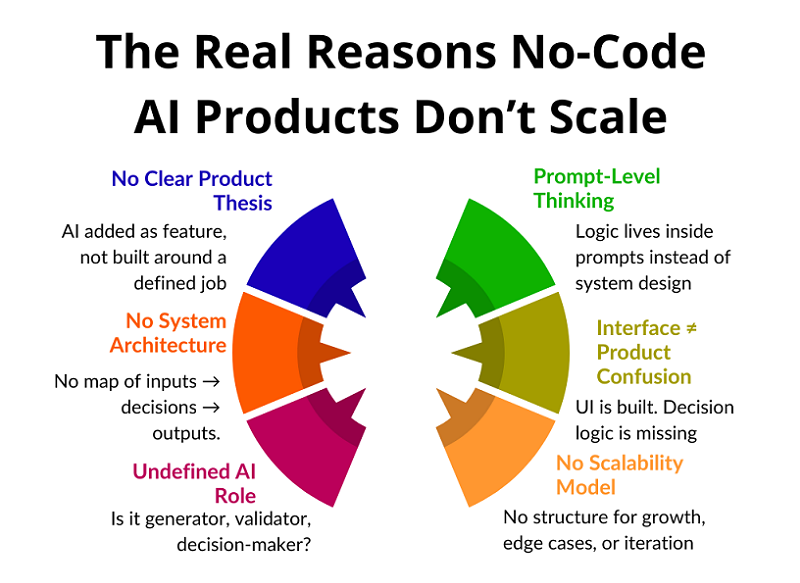
1. Why Most No-Code AI Products Don’t Scale

Most no-code AI products don’t break when they reach a large number of users. They break much earlier—when the product needs to do more than just one simple function. This is where architectural flaws, disguised as “tool limitations,” emerge.

The typical scenario goes like this: everything works at first, users are happy, and the requests are simple. Then edge cases emerge, new scenarios emerge, different user types emerge, and decisions need to be made. And suddenly, the product doesn’t understand itself.

People start adding workarounds: new prompts, additional steps, more automation. But each such patch increases chaos rather than solving the root problem. The product becomes fragile, unpredictable, and difficult to maintain.

It’s important to understand the key thing: scaling isn’t about load, but about structure. If the product’s logic isn’t formalized, no amount of AI will save it. And that’s precisely why most no-code AI projects never achieve sustainable growth.

Why Products Break

Most no-code AI products don’t “die” abruptly. They fail gradually, almost unnoticed by the creator. First, strange responses appear, then inconsistent behavior, and then users simply stop trusting the product, even if it formally continues to function.

The key cause of failure is the discrepancy between expectations and the product’s behavior. The user begins to perceive the product as a system capable of understanding context and goals. But the product, in essence, remains a set of isolated reactions. This creates a feeling of instability and unpredictability.

In the early stages, such problems are masked. A small number of users, simple scenarios, and manual intervention create the illusion that everything is under control. But as the load increases, each new scenario intensifies chaos because the product lacks a centralized decision-making center.

Products fail not because of growth, but because growth reveals a lack of architecture. AI begins to respond “incorrectly” because it has nothing to guide it beyond the local request. There are no rules, no priorities, no system-level memory.

As a result, the product becomes unreliable. The user doesn’t know what to expect next, and the creator can’t explain why the product behaved the way it did. At this point, scaling becomes impossible—not technically, but conceptually.

If this pattern feels familiar, it’s not accidental. Most AI products fail long before technical scaling becomes an issue — not because of models or APIs, but because of structural thinking mistakes.

We break this down in detail in Why Most AI Products Fail Before Reaching Real Users, where we analyze the recurring product-level errors that prevent AI services from becoming stable, trusted systems.

Where People Get Stuck

The main bottleneck arises when the product needs to start behaving like a system, not a reactive script. As long as the user asks simple questions, the AI can successfully respond, even if there’s chaos under the hood. But as soon as it needs to take into account context, interaction history, user goals, or the state of the product, everything begins to fall apart.

At this point, it becomes clear that the product doesn’t “think.” It simply reacts. It has no model of the world, no understanding of why the user is there, or what should happen next. Each request is processed in isolation, as if the previous steps didn’t exist.

Instead of a system, a set of disjointed reactions emerges. One prompt is responsible for one thing, another for another, with no connections between them. The logic isn’t formalized, and the product’s behavior becomes random. Sometimes the result is good, sometimes it’s strange, and no one can explain exactly why.

When the user base is small, this may seem like “normal AI error.” But as the number of users grows, such products lose credibility. Users expect predictability and consistency, but instead receive a chaotic experience. This is where most no-code AI products hit a ceiling that’s impossible to break without restructuring their thinking.

Why the Problem Isn’t in the Tools

When a product starts to break, the first reaction is to blame the tools. People point to limitations, APIs, model quality, or the platform’s lack of maturity. This is psychologically convenient because it removes responsibility from the product’s architecture.

But tools almost always do exactly what they’re told. If the result is unstable, it means the problem statement is unstable. If the responses are unpredictable, it means the product hasn’t defined clear behavioral boundaries. AI can’t compensate for the lack of structure.

Modern no-code and AI platforms are already powerful enough to implement complex scenarios. They don’t limit thinking—they expose it. All the logical holes previously hidden behind code come to the surface.

Without architecture, even the most flexible stack devolves into chaos. Adding new elements only increases entropy. The problem isn’t the tools, but that the product wasn’t designed as a system from the start.

Lack of Systems Thinking

The main reason for failure is the lack of systems thinking at the product level. Most people think in terms of interfaces, screens, and individual features. This works for simple SaaS, but in AI products, this approach quickly breaks down.

An AI product isn’t a set of screens, but a chain of processes. It has input data, interpretation rules, decision points, and an expected outcome. If these elements aren’t explicitly described, the product begins to guess instead of work.

The key question that almost no one asks is: how does a product make decisions? Not what it answers, but why it chooses this particular scenario. If you can’t explain this, then the decisions aren’t built in.

Guessing might work at first, but it doesn’t scale. As users grow, the number of scenarios grows, and with it, chaos. Without systems thinking, an AI product inevitably becomes unpredictable and fragile.

2. ChatGPT Is Not a Tool. It’s a System Layer

The key mistake most AI products make is treating ChatGPT as a tool. They invoke the tool, get a result, and move on. The system layer works differently: all product logic flows through it.

When ChatGPT is used as a layer, it ceases to be a “chat tool.” It becomes an intermediary between input data, business logic, and user output. This is where codeless scalability becomes possible.

ChatGPT handles roles, rules, and contexts very well. But only if you think in terms of functions, not requests. A single prompt is not an architecture. Architecture begins where there is a separation of concerns.

It’s also important to understand the difference between generation and decision making. Most products use AI for text generation, but rarely use it for logic. And it’s logic that determines scale.

When ChatGPT is built as a system layer, the product becomes flexible. Adding new scenarios doesn’t break old ones. Behavior becomes predictable, and development is manageable.

This is the fundamental difference between a scalable AI product and a set of automations.

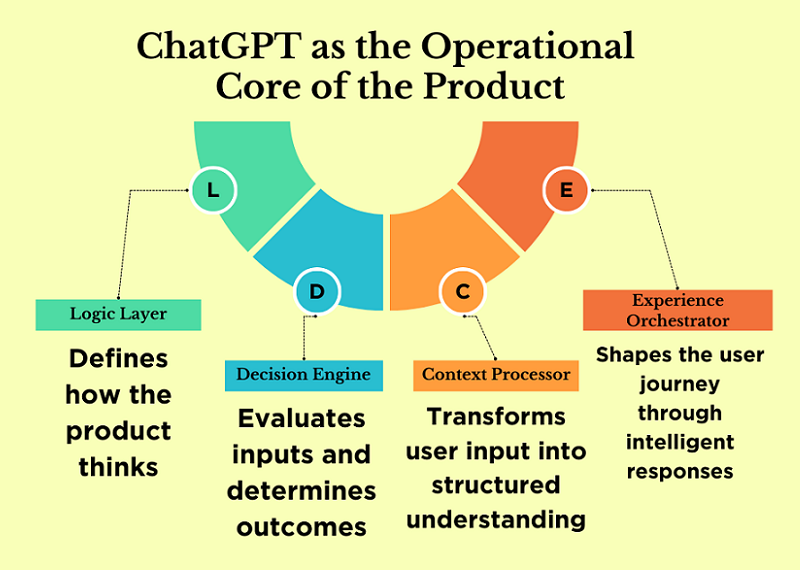
ChatGPT as Product Logic

When ChatGPT is used as product logic, it ceases to be a response generator. In this role, it is responsible for the product’s behavioral rules: what is acceptable, what is not, what steps are possible, and in what order they should occur.

This is the interpretation layer, not the generation layer. The model doesn’t simply output text; it interprets input data according to defined principles. Essentially, ChatGPT becomes the carrier of the product’s business logic.

The product ceases to be rigidly coded. Fixed scenarios are replaced by rules that can be expanded and refined. This allows for the addition of new features without rewriting the entire logic.

It is at this level that codeless scalability emerges. When logic is moved to the system layer, the product can grow in complexity without losing manageability.

ChatGPT as a Decision Engine

A decision engine is a component that determines what to do next: which scenario to choose, which step is logical in the current context, which action will bring the most value to the user.

Most no-code AI products simply lack this layer. All decisions are hardcoded into prompts or delegated to the user. As a result, the product doesn’t manage the process—it merely reacts.

ChatGPT is ideal as a decision engine because it can handle context, conditions, and priorities. But only if decisions are formalized. The model must understand which factors are important and how to weigh them.

The decision engine is the heart of the product. Without it, neither scalability nor predictability is possible. It is the absence of this layer that often limits the growth of no-code AI projects.

ChatGPT as a UX Layer

User experience isn’t a design or an interface. It’s how a product interacts with the user over time. In AI-powered products, UX is defined by dialogue logic, reactions, and contextual adaptation.

When ChatGPT is used as a UX layer, it manages this interaction. It adapts product behavior to the user’s level, their goals, and their current stage. Meanwhile, the product’s structure can remain unchanged.

This approach allows for personalized experiences without complicating the architecture. The same product feels different to different users, but remains manageable internally.

When UX is integrated into the AI layer, personalization becomes the standard, not the exception. This provides a significant advantage during growth and makes the product resilient to increasing complexity.

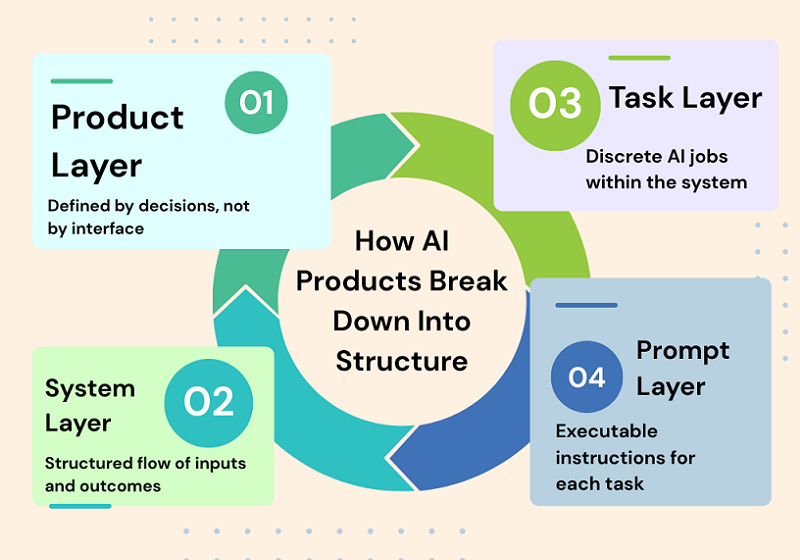
3. The Core Mental Model: From Product → Systems → Tasks → Prompts

Most no-code AI products fail not because of bad prompts or weak models, but because of a faulty mental model. People start with the interface, then move on to individual screens, buttons, and automations, and only at the very end do they consider the logic. This approach doesn’t work in AI products. It’s important to start not with how the product looks, but with how it makes decisions.

An AI product isn’t a UI or a set of features. It’s a chain of decisions that is triggered by input data, processed through context and rules, and culminates in a meaningful outcome. If this chain isn’t described, no amount of prompts will save it. That’s why scalable AI products are always designed top-down: from the system to the tasks, and only then to specific prompts.

Product ≠ Interface

One of the most common mistakes is to assume that the product is equal to the interface. A screen, an input form, or a “Generate” button create the impression of a product, but they are not a product in themselves. The user comes not for the interface, but for the result: a decision, a recommendation, an action, or a response.

In an AI product, the interface is merely a way to convey context and obtain an output. All the value lies between these points. If you remove the UI and the product ceases to exist, then the product never existed.

Strong AI products can be described without a single screenshot: through the decisions they make and in what order. The interface can be changed, simplified, or completely redesigned, but the product logic must remain stable.

This shift — from interface thinking to behavioral thinking — is what separates experimental AI projects from real products. In AI systems, UX doesn’t start with screens; it starts with decision logic, context handling, and predictable behavior.

If you want a deeper breakdown of how UX and system architecture merge in AI products, read our detailed guide on Designing and Building AI Products and Services — From UX to System Architecture.

It explores how user experience, context design, and system structure must be treated as a unified layer — especially in no-code AI environments.

Product as a chain of decisions

It’s more accurate to think of a product as a sequence of decisions rather than a set of features. At each step, the system answers a specific question: what’s important now, what should be ignored, what’s the logical next step.

For example, an AI assistant doesn’t “answer a request,” but first determines the type of task, then evaluates the user’s context, then chooses a response strategy, and only then generates a conclusion.

If these steps aren’t explicitly described, the model begins to guess. While this seems acceptable when the user base is small, as the system grows, it becomes unstable and unpredictable.

Scalability emerges when each decision in the chain can be explained, repeated, and modified if necessary.

Decomposition of an AI product: input → processing → context → output

Any AI product, regardless of complexity, can be decomposed into four basic blocks. The first is input: what exactly the user transmits to the system and in what form. The second is processing: what rules, filters, and checks are applied before accessing the model.

The third block is context. This is the most underestimated part, where the user’s history, goals, product constraints, and business rules are stored. Without context, the model operates blindly. And only the fourth block is output: response format, tone, structure, and constraints. When these blocks are separated, the product becomes manageable. Individual parts can be improved without disrupting the entire system.

This decomposition makes it possible to build complex AI products without code, but with a clear architecture.

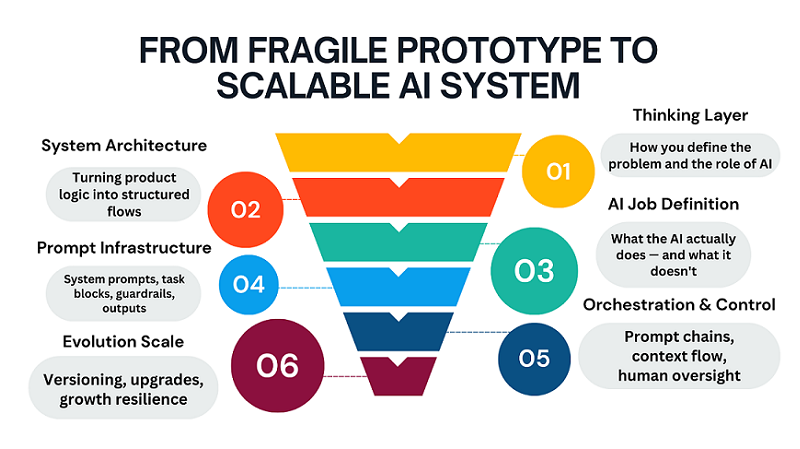
4. Defining the AI Job (Before Any Prompting)

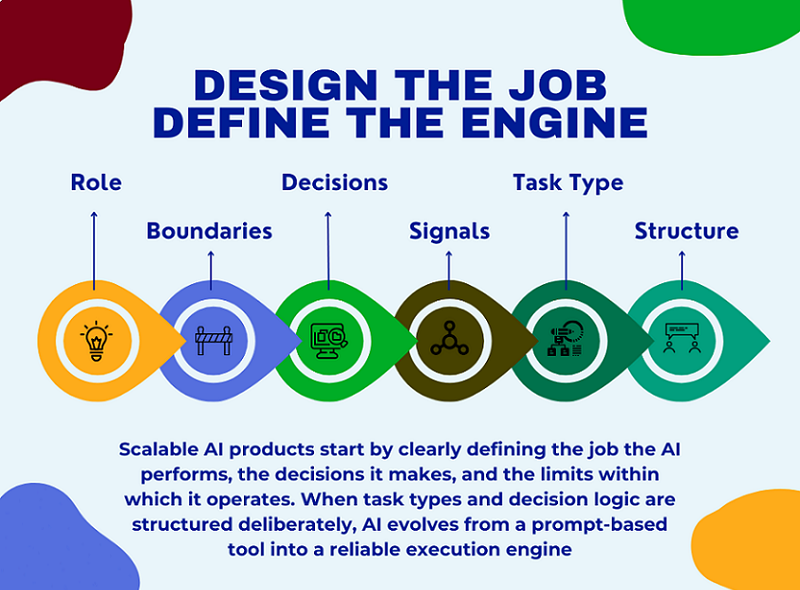
Before writing the first prompt, you need to answer the key question: what work does the AI do for the user? Not “what does it generate,” but what problem does it solve and what decisions does it make instead of humans?

Most no-code projects skip this step and immediately move on to experimenting with prompts. The result is a set of answers that lack logic and predictability.

Defining the AI job is the foundation of the product. If you can’t describe it in one or two sentences, the product isn’t ready for implementation. This step saves dozens of hours of rework and scaling down the road.

This is exactly where most founders get stuck — not because they can’t build, but because they start building without a validated direction.

Before defining prompts, flows, or system rules, there must be clarity around the problem itself. A scalable AI product doesn’t start with automation; it starts with a clear, narrow SaaS idea that solves a painful, repeatable problem for a specific user group.

Many no-code AI projects fail not due to poor execution, but because the initial idea was too abstract, too broad, or disconnected from real user demand. Without pressure from a real market, even the most elegant system architecture ends up solving the wrong problem.

If you’re still exploring where strong SaaS ideas actually come from — and how to quickly filter signal from noise — I’ve shared the exact process I use in this free lesson: Day 1 — Where to Find Great SaaS Ideas (and how to vet them)

The focus is not on brainstorming, but on identifying problems worth building systems around, before any prompts, tools, or automation come into play.

If you’re still at the idea stage and need a practical walkthrough from defining the concept to launching with first users, read our guide: How to Build an AI Product Step by Step — From Idea to First Users (No Code). It breaks down the entire path from idea clarity to real-world validation without requiring technical skills.

What exactly does AI do for the user?

AI shouldn’t be a “smart conversationalist” or a “universal assistant.” It should have a clear role. For example, analyzing data, helping with decision-making, structuring information, or automating routine tasks.

The more precisely the AI’s role is defined, the more stable the product will be. The user should understand what they’re paying for and what results they’ll get.

It’s also important to define boundaries: what the AI always does and what it never does. These limitations build trust and facilitate scaling.

A good AI job sounds like a job description, not a marketing slogan.

What decisions does AI make independently?

The next level is decisions. It’s important to clearly define where the AI makes decisions independently and where it simply executes instructions. This could be scenario selection, information prioritization, or determining the next step.

If the AI doesn’t make decisions but only reacts, the product quickly hits a ceiling. It can’t adapt to complex cases and non-standard users.

Decisions must be formalized: what signals are used to make them and what options are acceptable.

This approach transforms AI from a text generator into a decision engine that delivers real business value.

Task types: generation, transformation, analysis, classification

All AI tasks can be reduced to a few basic types. Generation is the creation of new content from scratch. Transformation is the modification or improvement of existing data. Analysis is the extraction of meaning, conclusions, and insights.

Classification is the distribution of information into categories or scenarios.

It’s important not to mix these types in the same step. When a single prompt tries to do everything at once, the result becomes unstable.

Separating tasks by type simplifies the architecture and makes the product predictable. This is especially critical for no-code solutions, where logic is more important than tools.

5. Turning a Product Into Prompt Blocks

Once the AI Job is defined, you can move on to the next step: transforming the product into prompt blocks. And this is where what distinguishes a scalable AI product from a collection of tooltips begins.

Most projects use one big prompt and hope it will solve everything. In practice, this leads to instability, errors, and the inability to further develop the product.

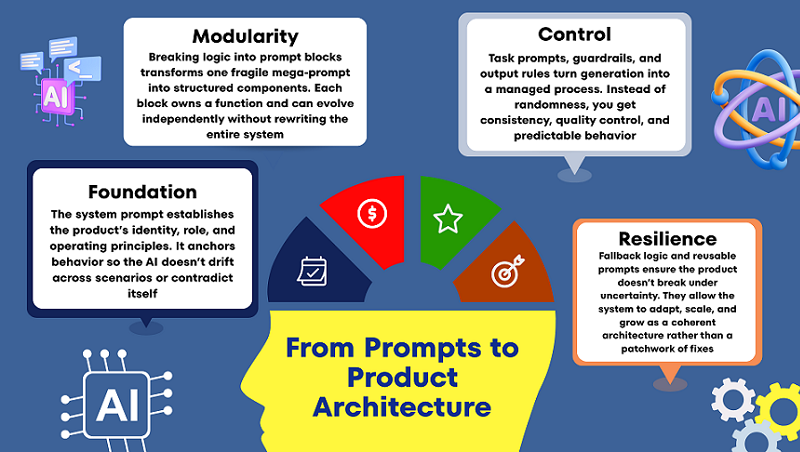
Prompt blocks are a way to break down product logic into manageable parts. Each block is responsible for its own function and can be modified independently.

This approach allows you to update the product without rewriting the entire logic. This is especially important as users grow and new scenarios emerge.

It’s important to understand: prompt blocks are not about text, but about structure. They reflect how the product thinks, not what it writes.

This is where the no-code approach truly shines: you work with logic and rules, not code and architecture.

The system prompt as a product foundation

The system prompt defines the basic rules of AI behavior. This isn’t a “be an expert” instruction, but a description of the system’s role, boundaries, and operating principles.

It answers questions such as what is acceptable and what is unacceptable, and how the product interacts with the user. Without this, the AI begins to “float” between scenarios.

A good system prompt rarely changes. It reflects the product’s philosophy and positioning.

If the system prompt isn’t defined, each task prompt begins to pull the product in its own direction. Ultimately, the logic falls apart.

Task prompts, guardrails, and output rules

A task prompt is responsible for a specific task at a specific moment. It is always shorter and more focused than a system prompt.

Guardrails are used to restrict AI behavior: what it shouldn’t do, what errors are unacceptable, what formats are prohibited.

Output rules determine the appearance of the output, not its contents. This reduces variability and improves quality. Together, these elements transform generation into a controlled process, not a lottery.

Fallback Logic and Reusable Prompts

Even the best system makes mistakes sometimes. Therefore, a scalable product always includes fallback logic: what to do if the AI is unsure or the context is insufficient.

This could be a clarifying question, a simplified scenario, or a safe default response. The main thing is that the product shouldn’t break.

Reusable prompts allow the same logic blocks to be used in different parts of the product. This speeds up development and reduces errors.

When prompts become reusable, the product begins to grow as a system, not as a set of workarounds.

6. Designing Prompt Chains That Don’t Break at Scale

In the early stages, almost any AI product relies on a single, large prompt. This seems convenient: everything is in one place, fast, and without unnecessary structure. But this is precisely where future failures occur.

One long prompt may work for a dozen users, but as it grows, it becomes fragile, unpredictable, and practically unmanageable. Any change breaks something else.

Prompt chains are a way to turn generation into a process. Instead of a single “magic prompt,” the product begins to think in steps. Each step solves its own problem and passes the result on.

This approach reduces complexity, simplifies debugging, and allows the system to scale without rewriting everything from scratch.

It’s important to understand: prompt chains are not a technical optimization, but a product optimization. They reflect how the product makes decisions.

When prompt chains are designed correctly, the AI becomes predictable and reliable, even as the workload and number of users grows.

In this section, we’ll look at why chains always win over single prompts and how to build them so they don’t fall apart over time.

Single Prompt vs. Chained Processes: What’s the Real Difference?

A single prompt tries to handle everything at once: understand the context, make a decision, and return a result. This overloads the model and increases the likelihood of errors.

In a chained process, each prompt performs a single role: analyze, clarify, make a decision, or generate a response. This reduces the cognitive load on the system.

The main advantage of chained processes is manageability. You can improve one step without affecting the others. This approach makes the product flexible: adding new logic doesn’t require rewriting everything.

To the user, it feels like a “smart product,” not like a chat with good answers. Chained processes allow the AI to guide the user, rather than simply react to requests.

Why long prompts break with growth

A long prompt is a hidden monolith. It’s difficult to read, hard to update, and almost impossible to test. When new conditions are added, it becomes inconsistent: some instructions begin to conflict with others. The model begins to “guess” which rules are more important, and response quality becomes unstable.

As users grow, this becomes especially pronounced: identical queries yield different results. Breaking the prompt into chains allows you to clearly define priorities and the order of actions. This reduces the number of unexpected responses and simplifies quality control.

Conveying context and reducing errors in flowcharts

Context isn’t just a message history. It’s the user’s goal, the current state of the task, and the product’s limitations.

In flowcharts, context is conveyed deliberately: each step receives only what it needs. This reduces noise and reduces the likelihood of hallucinations. Errors are easier to localize: if something goes wrong, you know which step.

Additional checks between steps allow you to filter out weak or incomplete results. As a result, the product becomes resilient even in complex use cases.

7. Human-in-the-Loop Without Killing Automation

Full automation is a beautiful idea, but it rarely works 100% in real AI products, especially during the growth phase. Attempts to completely remove humans often lead to a drop in quality and a loss of user trust.

Human-in-the-loop isn’t a sign of system weakness, but rather a sign of product maturity. The goal isn’t to “check everything,” but to intervene where it’s truly needed. A properly integrated human enhances automation, not hinders it.

Human verification helps the system learn, adjust, and remain reliable in challenging situations.

In this section, we’ll discuss how to integrate manual verification so that the product remains scalable. We’ll also discuss why quality is a product strategy, not a technical metric.

Where manual verification is truly necessary

Human verification is needed where errors are costly: legal formulations, finances, and reputational risks. Manual verification is also important in new or rare scenarios where data is still scarce.

In the early stages, this helps quickly identify system failures.

It’s important that verification be targeted, not comprehensive. Otherwise, the product becomes a high-cost semi-automated system. Manual verification should enhance the system, not replace it.

Where automation should work without human intervention

Repetitive, standardized tasks are ideal for full automation.

If the scenario is stable and well-defined, human intervention only slows down the process. Here, it’s important to trust the system and measure overall quality, not individual errors.

Automation should resolve 80–90% of typical cases. This creates a sense of speed and reliability for the user. Human intervention is only necessary in exceptional cases.

Quality, Hallucinations, and Product Trust

Hallucinations aren’t a model bug, but a consequence of poor product logic. They most often occur when AI is forced to respond without sufficient context or constraints.

Human-in-the-loop technology allows us to detect such cases and adjust the system accordingly.

But even more important is to design the product so that AI can honestly say, “I’m not sure.” This paradoxically increases user trust. A high-quality AI product isn’t one that always responds, but one that knows when not to respond.

8. Making the AI System Upgradeable (Very Important)

Most AI products look good at the start, but start to fall apart with the first changes. If you need to change the logic, everything breaks. If you need to improve the quality, you have to rewrite half the system. This happens because the product was initially designed as one big prompt, not as an upgradable system.

An upgradable AI product is one where change is not a concern. You can strengthen the logic, change behavior, add constraints, and improve the result without rewriting everything from scratch. This approach is especially important for no-code projects, where the cost of error is higher and technical debt is not visible until the very last moment. In this section, we’ll explore how to think about an AI system so that it lives and evolves alongside the product.

Decoupling Logic From Prompts

The biggest mistake is storing all the logic within a single prompt. When logic is mixed with text, any change becomes risky. An upgradable system takes rules, steps, and conditions outside the wording.

A prompt should execute logic, not contain it entirely. This way, you can change behavior without rewriting instructions. This reduces bugs and speeds up iterations. As a result, the product becomes manageable, not brittle.

Prompt Versioning as a Product Primitive

Versioning isn’t about accuracy, but about product survival. Without versions, you don’t know what exactly improved or worsened the result. Every logic change should have its own version and purpose. This allows for rollbacks, comparisons, and hypothesis testing.

Versioning transforms chaotic edits into managed development. Even without code, you can build a simple yet reliable versioning system. This way, an AI product begins to evolve, not degrade.

Scaling Users Without Scaling Chaos

User growth always exacerbates a system’s weaknesses. What worked for 10 users breaks down for 100. An upgradable AI system anticipates increased load and a variety of scenarios. This means clear constraints, fallback logic, and predictable outputs.

It’s important for the system to behave reliably even with erroneous input data. This is where
most no-code products begin to fail. A good architecture scales more smoothly than it seems.

Why Most AI Products Break at This Stage

Most products fail not because of the model, but because of the structure. Founders try to “improve the answers” instead of improving the system. Every change increases complexity and reduces control. At some point, no one understands how the product works. This is the point where development stalls.

Upgradeable thinking prevents this scenario from happening. It transforms AI from a hack into a long-term asset.

9. Real Examples: From Prompt → Micro SaaS Feature

Abstract concepts are useful, but real-world examples best demonstrate the product’s thinking. It’s important to understand: a Micro SaaS feature isn’t “AI that writes something.” It’s a limited, repeatable value for a specific user.

In all the examples below, AI is just one layer within the system. We won’t discuss specific tools or platforms. The focus is on the logic, structure, and product presentation. This is how a prompt becomes a commercial feature.

From Text Generation to a Writing Workflow

AI writers as a product aren’t just text generation on demand. It’s a controlled process with a goal, style, and constraints. The user doesn’t receive “options,” but a result tailored to their task.

The system knows what to write, why, and in what format. Context and rules are more important than wording. Thus, AI becomes part of the workflow. This is a Micro SaaS feature, not a demo model.

Turning Analysis Into a Decision Engine

An AI analyzer isn’t just about analyzing input data. Value emerges when the system makes conclusions and recommendations. The user pays for time savings and clarity. A good feature hides complexity but preserves logic. Analysis is always tied to context and purpose. The output is an action, not a report. This is how AI begins to influence business decisions.

Building an Assistant That Knows Its Role

An AI assistant breaks down when it tries to be “everyone.” A product assistant always has a clear role. It knows what it can and cannot do. It remembers the state of the process and the next step. Such an assistant doesn’t just chatter—it helps. The role constrains the model and amplifies the result. This turns the assistant into a valuable feature, not a toy.

10. Common Mistakes Non-Technical Founders Make

Almost all mistakes in AI products appear technical, but they are actually product-related.

Founders without a technical background rarely make mistakes due to a lack of code—they make mistakes due to a lack of structured thinking. AI appears “smart,” which creates the illusion that it will figure out how to work correctly. As a result, the product is assembled as a set of chaotic solutions that only work under ideal conditions.

It’s important to understand: these mistakes are not made by newbies, but by smart, motivated people. They simply think in terms of tools, not systems. Below are the most common patterns that prevent an AI product from reaching real users and achieving stable growth.

The “One Big Prompt” by Fallacy

One huge prompt seems like a simple and quick solution. At first, it can actually produce good results. But the more logic you cram into it, the less manageable it becomes. Any change starts to break behavior in unexpected places. You lose track of why the product works the way it does. A large prompt is impossible to scale and improve systemically. Ultimately, it becomes a single point of failure for the entire product.

Believing One Model Can Do Everything

The idea that “one model can solve everything” sounds tempting. But in real-world products, the tasks are too diverse in nature.

Decision generation, analysis, and decision making require different approaches. When everything is mixed in a single request, quality deteriorates unnoticeably. The model begins to guess instead of acting logically.

The product loses predictability and user trust. Good AI systems separate roles, rather than relying on magic.

Building Without a Systemic Structure

Lack of structure is the most costly mistake. The product is built around screens, not logic. There’s no clear understanding of input, processing, and output. Each new feature is added on top of the old, not within the system. Over time, the product becomes fragile and complex. Fixes begin to cost more than the initial build. Without structure, an AI product doesn’t last long.

Ignoring Constraints and Guardrails

Many founders are afraid to limit AI. It seems that limitations reduce the product’s intelligence. In fact, it’s the opposite: limitations create reliability. Without guardrails, AI begins to behave unpredictably. Errors don’t appear immediately, but as users grow. Users see chaos where they expected stability. A good product always knows what it shouldn’t do.

Final Thoughts: AI Products Are Built With Thinking, Not Code

AI products win not through technology, but through thinking. Code is now accessible to everyone, and models are becoming cheaper and more powerful every month.

Real advantage emerges where there is clarity, structure, and focus. A product is not an interface or a prompt, but a decision system. When you start thinking about AI as a logical layer, everything changes. You stop chasing “better answers” and start building controlled behavior. That’s when predictability, quality, and scalability begin to appear.

Long-term AI products aren’t built over a weekend. But they also don’t require large teams or complex code. They require disciplined thinking and a product-first approach. This is especially important in a no-code environment, where architectural mistakes are invisible at first — and expensive later.

For a solo founder, this isn’t a limitation, but an advantage. You can design your system intentionally, without unnecessary complexity. You move faster, iterate faster, and learn faster. AI amplifies founders who think in systems.

But architecture alone isn’t enough. A scalable system only matters when it’s tested in the real world with real users. Once your AI logic is structured and your product thinking is clear, the next step is execution and validation.

If you’re ready to move from system design to real-world traction, follow our step-by-step guide on how to launch an AI SaaS and get your first users in 30 days.

ai-saas-roadmap

AI SaaS Roadmap: From Idea to First Users in 30 Days Without Heavy Coding

Building an AI SaaS solution no longer requires a large team of developers and months of development. You also don’t need to spend a huge budget on developing a micro SaaS solution. You can do it all yourself.

Of course, there are still many nuances to consider when building and launching your project, but today, everything has become hundreds of times simpler than it was before the advent of AI.

This guide will help you navigate a practical roadmap to turning your idea into a working and powerful AI SaaS product, test its value for your future clients, and get your first paying users within 30 days of starting development. All this without complex coding or a complicated infrastructure.

Day 1 – 3: Finding and Validating Your AI SaaS Idea

Our modern internet is full of routine tasks, and company employees, as well as anyone who does business online, want to automate them. This allows them to speed up many work processes, and of course, they’re willing to pay you to solve these routine tasks using AI-powered SaaS tools.

You can also already use some micro SaaS in your work and pay monthly fees for its use. This allows you to move faster in solving problems in your online business with AI-based SaaS solutions.

Now consider why you or someone else uses a specific AI SaaS solution that generates excellent profits for the owner of that AI SaaS business. Try to explain its value to users and why they are willing to pay monthly for its use.

This will help you understand what the market actually wants, and this will be your starting point for understanding how to create and launch similar AI SaaS apps and programs in today’s market.

At this stage, it’s also important to clearly understand what type of product you’re planning to build. The strategic difference between a full-scale AI SaaS platform and a focused micro-SaaS directly affects validation speed, monetization, and growth potential. If you’re unsure which model fits your idea best, this detailed breakdown explains the key differences and trade-offs between them: AI SaaS Platform vs Micro-SaaS: How to Build, Scale and Monetize Your Product Successfully

Below you can see a specific graph showing how the SaaS market shares are distributed at the moment.

However, the chart can’t accurately predict which micro AI SaaS project will work best for you. To find out, you simply need to look at existing AI SaaS products already on the market and consider them first.

a) How Quickly SaaS Became Successful

The first thing you should pay attention to is how long it took the AI SaaS project to become popular. If it’s already reached $20,000 in MRR in 6–12 months, that’s rapid growth, and you need to pay attention to why.

b) Understanding Promotion Methods

So, your second step is to determine why this rapid growth occurred. That is, you need to figure out what promotion methods the owner used to enable their AI SaaS product to grow so quickly and become profitable.

c) Why Users Chose This AI SaaS Solution

The third step is to look at the useful features of the AI-powered SaaS software, which is already used by hundreds, maybe even thousands, of users. Sometimes you can test several free AI SaaS tools yourself to understand why they’ve become popular. This is very helpful in understanding which MVP to build for your future target audience.

Now you should have a clear picture of how to build your micro AI SaaS project to ensure its success.

Day 4 – 6: Selecting a Domain, Hosting, and Creating a Website for an AI SaaS Project

For some, choosing a domain may seem easy, and for others, difficult, but in fact, you need to understand several nuances, namely:

a) The Domain Name Should Be Short and Memorable

Choose your domain name carefully because it reflects the essence of your AI SaaS business. If it’s long and confusing, it will confuse users. Try not to limit your imagination to just .com or .net extensions, but make sure they resonate with you and your users.

b) Use Niche Keywords in your Domain Name

A unique domain name allows you to differentiate your AI SaaS product from your competitors. Furthermore, the right niche keywords in your domain will help your target audience find your AI-powered SaaS solution faster. Essentially, you’ll attract only the right clients for your business. If you want a deeper breakdown with practical examples, check out our detailed guide on how to choose the best domain name for your AI SaaS project.

c) Avoid Trendy Names that may Become Outdated

Trendy names are often based on current fads, popular slang, or viral phrases. While they may feel excited at the moment, trends can change quickly over time. A domain that relies on a trend might seem outdated or irrelevant in a few years. Choosing a timeless name ensures your AI SaaS brand remains professional and recognizable long-term.

When choosing hosting for your AI SaaS project, you’re initially choosing a less expensive but reliable hosting solution. Let’s look at what we mean by “reliable.”

The speed of your pages loading and security—where your data and that of your clients are protected—are crucial here. It’s also crucial to have ongoing technical support available, so if you have any questions about your hosting, you can contact them via live chat and get answers.

In fact, when developing a simple micro SaaS website, the cheapest standard hosting will be sufficient. I recommend choosing Hostinger

The price is practically a gift, because $1.99 + 2 extra months is a very small price and it will suit you.

What are the benefits and what exactly do you get?

a) You can create up to 3 websites simultaneously.
b) You get 20 GB of space for your files on your SSD drive.
c) 2 Mailboxes for your website
d) Free domain for 1 year of hosting
e) And much more that you can find out about on the Hostinger service itself.

Our service also chose Hostinger because it offers a number of advantages over other hosting providers, including WordPress optimization, stable uptime, Cloudflare integration, daily backups, and automatic SSL and HTTPS. However, even if you’re a beginner starting your own micro SaaS project, simply setting up a website and creating a dedicated email address is enough to kickstart your web project. This is all done virtually automatically with Hostinger. That’s its main goal—to make things as easy as possible for everyone.

Once you’ve purchased hosting space, the next step is installing WordPress. This is done automatically when you purchase web hosting for your AI SaaS project.

WordPress is popular worldwide because it’s easy to use, flexible, and suitable for any type of website. Plus, it has many useful plugins.

It allows developers and beginners alike to build, scale, and manage projects efficiently with a huge ecosystem of themes and plugins.

Hostinger is optimized specifically for WordPress, offering fast performance and high stability for WordPress themes.

An essential step in website creation is creating a showcase where you’ll tell your future customers about your product and what they’ll get when they purchase it. To achieve this, you need to fill your site with the right content.

You choose any free WordPress theme, like Phlox, and then select a child theme to match it and install it on top. Everything starts working.

Phlox has a ton of different templates, and you can choose one of the free ones for your AI SaaS project.

Phlox has a ton of different templates, and you can choose one of the free ones for your AI SaaS project.

Let’s go over how it all works step by step:

a) WordPress – is the engine on which everything works, that is, you install your WordPress themes and plugins on it.

b) Phlox is a Premium WordPress theme, or, in simpler terms, it’s a design plus functionality on top of WordPress.

c) Child Theme is a child WordPress theme that is installed on top of a Premium Theme.

Next, it’s very easy to start adding sections to your website using Elementor.

You’d definitely want to know what Elementor is. It’s a visual web page builder for WordPress that lets you create websites with a drag-and-drop interface. It all works in real time, without any coding knowledge. It’s used worldwide because it’s flexible, fast, and beginner-friendly.

The next step is to create 4-5 simple but essential sections on the website. You’ve created your first SaaS solution, and now you’ll create a clear hero section that explains in one sentence what your product is about. The next section explains what your SaaS solution does and how it solves user problems. Social proof and testimonials build trust. Next, the pricing section is crucial, where website visitors decide whether to subscribe to your product. Also, don’t forget the footer, where you also place the main links to important supporting pages on your website.

Day 7: Creating Privacy Policy and TOS Pages

Every AI SaaS project works with algorithms and user data that make decisions or make recommendations. Terms of Use and Privacy Policy pages formally explain how the project operates, what data it may collect, and what it may use. This explanation protects both the user and the company from legal risks.

At first glance, it may seem that these pages are unnecessary for your micro SaaS business, but it’s best to create them from the start and thoroughly describe everything in them. As your business grows, you’ll need at least this level of protection.

a) Terms of Use are important for your project

This page contains information describing the terms of service use, the responsibilities of the parties, content restrictions and rights, payment and subscription terms. This is, of course, important for any SaaS project, as AI can produce results that aren’t always perfect. The user can understand that the service is provided as is. The company is protected from claims that may be unfounded or far-fetched.

b) The Privacy Policy page is also important

A privacy policy explains what data is collected (e.g., in-app behavior, analytics), what data is protected and where it is stored, with whom the data may be shared (e.g., integration with other services), and how the user can manage the data. This is critical for an AI SaaS project because the AI works with sensitive or personal data. Without a transparent privacy policy, the project risks violating laws (e.g., the GDPR or the CCPA). Transparent information on this page increases user trust.

c) Legal protection and investor confidence

Having these pages reduces the risk of lawsuits and demonstrates that the company takes its responsibility to its users seriously. This increases the trust of investors and partners. As your AI SaaS project grows, you’ll see how this can help it gain greater trust from international partners.

d) What else is important when creating a TOS and Privacy Policy?

There’s no need to write in complex language, but if you need to explain something using complex legal terms, don’t be afraid to do so. Update information as your project grows if you feel it’s necessary. Make pages easily accessible on the website.

Day 8: Creating a Sign Up Page to Collect Subscribers

Many newbies start by creating their own micro SaaS project and launch it right away. This approach can also be used to sell directly, but it’s better to create awareness of your AI SaaS project before you launch.

To do this, create a subscription page and a free product. This could be a basic version of your product or simply a PDF file in the form of an e-book where you explain the various features of your product. This way, you build an initial audience, which will make it easier to sell subscriptions at the start.

All this creates anticipation and gradually forms the basis for further marketing.

a) Preparing an email newsletter

Your task is to prepare a subscription page, and you can simply create a separate page on your website with all the information about what materials subscribers will receive after subscribing.

These people have already shown interest in your product, and you can communicate with them via email. This way, you’ll warm up your audience, converting those already interested in your free product or PDF file into users who will be ready to purchase your paid product right away.

b) Building trust and expertise

A subscription page and automatic emails sent every 2-3 days to your subscribers are a chance to demonstrate the value of your product and your team’s expertise even before the launch of your AI SaaS project.

You can send videos demonstrating the benefits of your AI SaaS service, and this way you begin to build trust with your target audience. Users begin to trust your expertise, and some will even purchase a subscription to your paid product at launch.

c) Preparing for a successful launch

Before launching your paid product, you no longer need to worry about how to attract paying subscribers. You already have a potential customer base.

You simply notify your subscribers about the release of your AI SaaS project and begin collecting initial feedback, activating paid subscriptions.

This increases conversion and accelerates subsequent project growth immediately after launch.

Day 9 -11: End-to-End Website Creation for an AI SaaS with Required Plugins

You’ve already chosen a specific WordPress theme and a child theme to create your website. You’ve also decided on the specific sections you want to create, and now it’s time to install the necessary plugins, which are literally essential for working with AI-powered SaaS projects.

a) WPS Hide Login

There’s a plugin that allows you to replace the default admin login /wp-login.php with any other login. This means anyone who knows the default admin login will no longer be able to access it. This plugin is enough for you to launch your micro SaaS project and protect yourself for now. It’s also important to save the login address you set in the plugin settings. Otherwise, you won’t be able to access the admin panel if you forget it. If you do forget it, you can deactivate the plugin at any time through your file manager. Then everything will be restored.

b) Yoast SEO

This plugin offers a variety of useful features. It helps you set up a sitemap and optimize your website for search engines. It makes SEO more understandable and accessible, even if you’re not an SEO expert. When starting your micro SaaS business, the free version of this plugin will be sufficient. It also helps analyze your articles and has a number of options that automate many SEO processes. It also easily integrates with other tools such as Google Search Console, Elementor, and WooCommerce. While this plugin doesn’t guarantee rapid traffic growth, it is truly indispensable when working with your website and editing content.

c) Royal Addons for Elementor

This is a plugin that extends the standard functionality of Elementor pages in WordPress. This means you no longer need to create pages for your site yourself; instead, you can use ready-made pages and sections from this package, embed them in your site, and customize the design as desired. This plugin requires no coding knowledge and is useful for both beginners and developers.

We’ve already discussed what a website’s homepage should look like, but let’s also consider what else needs to be done.

To start your project, you only need three pages: a Homepage, which will be your key webpage; a How It Works page; and a Blog, which you’ll need to share your expertise about.

Also, create an inbox and an AI chat on your website that will automatically answer your clients’ questions.

Design your website in a style that makes it more customer-focused. Many people create websites to tell more about their company. You need to make sure your customers understand that you’re showing them your product in a way that will be valuable to them. So, always strive to be customer-focused in your design and copy.

Day 12 – 14: Capturing Early Users for an AI SaaS Through a Signup Page

You’ve likely already read various recommendations on how to attract people through social media, or how to launch paid advertising and spend money on it. Again, you may be unsure whether the advertising will be effective. Moreover, some of you don’t even know how online advertising works or how to set it up.

However, there is a way that allows you to easily and inexpensively gain your first subscribers before launching your product.

It’s best to start gathering loyal users 2-3 months before the launch of your paid product. This way, they can test your free version, read about your product in a PDF file, or watch a video where you explain what the initial version of your paid product will look like. In any case, you need your first subscribers, and we’ll learn how to get them right now.

a) X

Surprisingly, it’s very easy to attract subscribers for AI-focused SaaS projects through X.com (formerly Twitter). You don’t need a huge audience to do this. Even 50–100 followers are more than enough to get started. To begin, publish 30–70 tweets and add one new post every day about how you’re building your SaaS, along with a few stories from your daily routine. So, you don’t need to try to accumulate tens of thousands of followers. The key is to follow 50-70 similarly popular niche profiles and see what other people are commenting on. Then, simply send them a DM to try to solve their problem, usually related to SaaS, and gradually, through conversation, invite them to subscribe to your newsletter. Usually, everyone readily agrees since it’s free. This way, you gain 30-40 subscribers per day.

b) LinkedIn

Start writing about your SaaS on LinkedIn. Present it so users can see how it works and the value your SaaS will bring early on. Divide it into posts with insights and case studies, followed by long-form articles where you talk about the product itself. Also, include visual content in the third article format, as it gets more reach. If you already have connections, such as B2B, you can use direct messages, but the key is to provide value rather than spam. Also, find groups related to your product and leave helpful comments, gently including a subscription link.

c) Free Version for Large Online Corporations

As crazy as it may sound, you can try distributing a version of your SaaS product to owners of large corporations at the start. They’ll be happy to test your product and likely talk about it on their blogs. This will be very profitable for you, and it won’t hurt that you’re giving them access for free. If 10-15 large online corporations write about you, it’ll be a huge success. You can find the contact information for these corporations publicly. The key is to understand who to contact, as your SaaS product may be targeted at a narrow audience, for example, and you need to understand what exactly to tell them. But in any case, this approach will work if you do it wisely.

Even if you manage to gain two or three hundred subscribers through your subscription page before launching your product, that’s already excellent news. That’s roughly 10-50 paid users at the start, and the conversion rate depends on how you present your product to them.

Typically, the average conversion rate is around 7%, meaning about 15-17 people will become paid subscribers, which is an excellent result. You can confidently say you’ve done a great job. If you have, say, about a thousand subscribers, then you’ve already got about 70 paid users, which is also an excellent result.

Don’t despair if your conversion rate is lower than you expected. This can be influenced by many different factors, such as the type of emails you send to your subscribers, how valuable your SaaS is to them, the price of your product, and so on. Therefore, if your conversion rate was low, you can ask your audience what’s wrong, and they’ll tell you. Then, you can gradually improve various metrics, and you’ll see that after these improvements, everything should fall into place.

Day 15 – 16: Choosing an Idea for Your Micro AI SaaS

When you want to start building a specific AI-based micro SaaS solution, it’s important to first understand what problems other people or businesses are facing.

A good idea almost always stems from a pain point that’s clear and something that people are willing to pay to solve. Here, you don’t need to search for a brilliant concept; it’s much more important to find a specific, focused problem and solve it better and more simply than other AI SaaS businesses.

Let’s look at the main things to pay attention to:

a) Problem and target audience

Many beginners make the mistake of starting with an idea instead of a problem. If you’re building an AI-based SaaS solution, you need a narrow pain point that’s common to a clearly defined group of people. You’re not creating a product for all businesses, but rather, say, “Owners of Online Stores Using WordPress.” It’s also important to understand that your potential client encounters the problem regularly, not just once a year, and that the problem has a significant impact on growth and time. Your client is already looking for a solution to this problem.

b) Willingness to Pay

Micro SaaS relies on a subscription model, so it’s important not only that your SaaS solves your customers’ problems, but that they are willing to pay regularly for it. You can simply check if there are similar services online. Of course, there are, because competition is always normal. Then determine whether your target audience is already paying for similar tools. Does the user directly benefit from them: more leads, time savings, lower costs? If someone says they could use it if it were free, they’re not your target audience. However, if they understand that they’re willing to try a free, stripped-down version of your AI-powered SaaS and are then willing to pay for expanded functionality, then you can engage with them.

c) Simplicity & MVP Speed

Your goal is to quickly create a micro-product that can be launched in just a few weeks. You don’t need complex infrastructure or lengthy development. The best idea for an AI-powered micro SaaS product is one that solves a single core problem rather than multiple tasks. It’s best when it can be implemented as a script or plugin and uses AI as an accelerator.

To conclude, a strong micro SaaS idea lies at the intersection of a specific target audience’s pain point, willingness to pay for a solution, and the ability to quickly create a simple product. If any of these aspects are weak, the idea will always falter. This is where the first free lesson comes in: it explains how to spot SaaS ideas with a narrow scope that can be validated and shipped quickly.

Day 17 – 20: Evaluating Free Solutions for a Micro AI SaaS Project

If you’d like to test your micro SaaS project first, as a founder, you can use free solutions that allow you to do so.

Local development environments such as Localhost and XAMPP are often used early on to develop small business projects and reduce even initial financial costs.

Don’t be intimidated by unfamiliar terms and tools. You can set them up in just a few minutes and understand their practical benefits.

a) Localhost Setup for Early Micro SaaS Development

This is where the magic begins: local hosting allows you to develop AI-powered SaaS entirely on your own computer. You don’t need to buy a domain, connect hosting, or install WordPress on the hosting. All the logic, interface, and functionality will be created locally. This is very convenient during the concept and development phase of the MVP. You don’t spend any money here. You are completely focused on the product and immersed in the process.

b) XAMPP as Simple All-in-One Free Stack

If you’re a beginner, don’t be intimidated by seemingly complex terms. Once you start breaking it down step by step, you’ll realize it’s much simpler than you imagined. XAMPP is a free package that includes a web server, a database, and, crucially, support for server-side programming languages. It lowers the technical barrier to entry and simplifies launching the server side of a micro SaaS project, especially for solo founders.

c) VS Code as the Primary Development Tool

Your entire project is edited in Visual Studio Code. It’s a free code editor. It is used for both the frontend and backend of your AI-powered SaaS project. Suitable for both beginners and experienced developers, it makes development more accessible. It makes editing code more convenient in one place, and it highlights errors. This significantly speeds up development and reduces errors, which is especially important for the rapid development of your SaaS project.

Consider these tools, as they’re free and allow you to launch a micro SaaS project quickly and affordably. They’re incredibly reliable tools to have on hand. This allows you to focus on the idea itself and test it faster. Once your idea is successful, switching to cloud services will ensure the scalability and stability of your AI powered SaaS business.

Day 21 – 25: Creating a Micro AI SaaS with ChatGPT: A No-Code Approach

Building your own AI-powered SaaS with ChatGPT has become easier than ever. You don’t need advanced programming skills to create a working product that solves specific user problems. What matters more than coding experience is your ability to ask precise questions, structure tasks correctly, and guide the AI step by step.

ChatGPT can generate production-ready code, suggest architecture decisions, and even help shape your MVP feature set. For early-stage founders, this removes one of the biggest barriers — technical complexity.

However, while this roadmap focuses on speed and fast validation, building something that scales requires a slightly deeper understanding of how AI components are structured behind the scenes. If you want a detailed breakdown of how to design scalable AI systems and use ChatGPT as the core intelligence layer, read our full guide on how to build scalable AI products without code.

Now, let’s move from theory to practice.

Imagine you want to create a simple WordPress plugin. Here’s how to approach it correctly with ChatGPT.

a) How to Properly Manage a ChatGPT Conversation

To ensure AI gives you the “right” answers, you need to be specific in your questions. Instead of writing, “Create a WordPress Plugin,” you should be more specific, specifically, “Create a WordPress Plugin That Automatically Generates a Table of Popular Posts and Displays It on the Home Page.” Of course, you need to start by understanding which programming languages you’ll use, who the plugin will be useful for, what your project structure will be, and what coding style you’ll use. These clear instructions will save you a lot of time and reduce the number of edits.

b) Planning Your Micro SaaS Project

Before you begin, it’s best to outline all the details you plan to include in the project. Decide exactly what features will be in the MVP. You can confidently collaborate with ChatGPT to create a feature list, architecture, and even marketing copy. But again, provide them with clear instructions, and then everything will go smoothly.

c) Creating WordPress Plugins Without Code

ChatGPT allows you to create small AI-powered SaaS projects in just a few days. While this might have previously taken you 1-2 months, now you can do it in just a weekend. Numerous plugins have already been created using AI, and they’ve become incredibly popular immediately after being published on the WordPress Marketplace. As you can see, what was once a difficult barrier to overcome is now a barrier you can easily leap over.

d) Rapid Growth of Your MVP

A quick launch allows you to test different ideas and quickly acquire your first users. Now you can analyze dozens of popular plugins and apps online and, based on them, create ones with undeniable potential to become equally popular. ChatGPT will help you create a quick MVP in a couple of days, accelerating your product’s growth.

e) What programming languages to use

If you want to create a micro SaaS project like a WordPress plugin, PHP is usually the preferred choice as the foundation for WordPress plugins. Then comes JavaScript, which is used for interactive elements and the frontend. HTML/CSS are needed for structure and design. When you create everything with No-Code using ChatGPT, you can quickly create entire chunks of code that you use when building your micro SaaS project. All this without extensive knowledge of languages.

f) Speeding Up the Communication Process with ChatGPT

Break down daily tasks into small steps. For example, first, you work on the frontend with AI, then the functionality. Then, you test what’s already working. This way, you move forward slowly but surely. If something isn’t clear, you can come back and ask ChatGPT what’s wrong and how to fix it. It’ll fix it in a jiffy. This allows you to launch and test everything quickly, without any coding knowledge.

ChatGPT allows you to quickly transform ideas into working micro SaaS products without programming knowledge. Asking the right questions and using no-code tools accelerates MVP creation and hypothesis testing.

This approach reduces costs and significantly shortens time to market, helping you focus on results and revenue.

Day 26 – 28: From Free to Paid: Freemius Payment Setup for a Micro AI SaaS

Now your micro SaaS is ready to be presented to the online community in its final form. It’s now ready to drive conversion and revenue growth.

The next logical step is to integrate Freemius, which has a built-in structure for converting free users into loyal paying customers.

Here, you can build a proper, live sales funnel using the many useful features Freemius provides. If you want to understand the practical side of this process — from connecting the SDK to configuring plans and licenses — this step-by-step guide explains how to set up Freemius payments for an AI micro-SaaS project.

At this stage, you don’t need to worry about money; it’s important to create the right path for users that will smoothly lead them to payment.

Freemius allows you to test different approaches to premium features, turning payment into a clearly thought-out marketing solution, not just a technical challenge.

a) Here’s Why Freemius Is Ideal for Micro SaaS

Its integration doesn’t require extensive resources, as it was created with micro-online projects in mind. You don’t need to figure out how to connect banking APIs, manage licenses, or track user subscriptions. The platform handles all of this automatically. If you need to know which features your users value, the Freemius platform will collect purchase and activation analytics for you. The documentation is always detailed for a quick launch. Even if you don’t understand the code, you can still quickly connect this payment system.

b) Connecting Freemius in One Day

Integration is very simple and divided into stages. You add your product or SDK to the project, then configure plans, including subscriptions, trial periods, and one-time payments. Before going live, test how payments work and ensure licenses are issued correctly. Then enable real-time payment acceptance. Ultimately, you’ll have a ready-made monetization solution with minimal effort.

c) We define Paid Features and Limitations of the Free Mode

You should always clearly distinguish between the free and paid versions of your product. The free version should always encourage upgrading to the paid version. This means either limiting product functionality or adding a trial period for premium features. However, it’s important for users to see the value of paid options through tooltips in the free product. If a user sees that upgrading to the paid version is better because it solves their problem, they’ll do so.

d) The Path to Conversion of Free Users to Paid Users

The main goal is to motivate free users to take the decisive step toward a paid subscription. Push notifications, emails, and communication with users via the free version of the product are all ways to encourage users to ultimately make their first payment. Special discounts at certain times increase the appeal of paid micro SaaS. You can use timers to create a sense of urgency.

e) Testing and Analytics of Paid Plans

Analyzing user payment data allows you to see which features of your SaaS system are needed and which are not. It’s also important to test different product and subscription prices to determine which is optimal. It’s also crucial to stay in close contact with users to quickly respond to their messages and fix any product issues. This  will help you maintain the trust of users and customers. Continuous analytics helps you develop a product growth strategy and increase revenue.

f) Customer Support and Paid User Retention

You’ll reach a point where you start seeing your first sales, followed by a steady stream of sales from your micro SaaS. This is where it’s crucial to provide prompt technical support to customers and work to retain them. You can create a knowledge base or FAQ to help customers quickly find the answers they need. It’s also important to occasionally upgrade your product and add new features to demonstrate the value of their subscription. Retaining paid users is often more effective than finding new ones who may not even have heard of your SaaS.

By properly integrating Freemius, you’ll start accepting payments and create a growth and conversion engine that will work automatically for you.

It’s important to think strategically about your users, demonstrate value, and gently nudge them toward payment. Ultimately, the Freemius platform becomes a scaling tool for your micro-SaaS. This is where the journey to your first paying users and stable revenue begins.

Day 29 – 30: Scaling an AI SaaS to 10–50 Paying Users per Month

You already have an AI-powered SaaS product and a configured payment system. The next step is to notify the users you’ve been collecting via email subscriptions while building your product about the launch.

These people have already shown interest in your product, and they will be the 10-50 paying users in the initial phase of your launch.

This is the moment when you’re not starting from scratch, but rather your product transforms from a project into a business with predictable revenue.

However, attracting your first 10–50 paying users requires a structured approach, not random promotion attempts. If you want a detailed breakdown of the exact tactics, outreach methods, and validation steps that help early-stage founders move from zero to consistent revenue, read our full guide: How to Scale a SaaS Business: Step-by-Step Guide to 10 – 50 Paid Users.

Below, we’ll briefly cover the core channels. The complete scaling framework is explained there in depth.

a) Social Networks for Attracting First Clients

When you’re first faced with attracting paid users, you’re not always choosing the quick and easy route. Some people think they can attract users from Reddit, while others turn to LinkedIn. These are both viable options, but they require following certain rules and understanding how to properly attract your first paid users. However, even social media platforms like Instagram, with a quick profile setup and daily posting, can generate paid users within 1-3 months.

b) Your Blog Is A Traffic Generator

In our modern world, writing articles quickly is no longer a myth, but a reality. AI can create lengthy guides useful to your users for you. All you need to do is choose the right keywords and optimize your website for search queries. Your users will find you through Google, and realizing that your article describing the actions of your micro SaaS was useful, they will ultimately buy your product. This approach works especially well for AI products, where marketing is built around real product value, fast activation, and trust — not traditional advertising mechanics. Thus, by publishing short articles month after month, you attract more and more new users to your website, and your profits grow.

c) Direct Tactics for Contacting Potential Clients

If your product solves a specific business problem, direct contact with the target audience works better than any other channel. Let’s imagine you’ve created a micro SaaS that writes articles and optimizes them for SEO. You contact editors and content managers at large corporations directly with an offer to test your SaaS. Within a month of active operation in this mode, you could potentially attract 30-60 paying users. It all works without running paid advertising on your part. It’s important to personalize your messages, mention the problem, and demonstrate how your product solves it. This approach takes time, but the results are worth the effort – you gain high-value clients.

Gradually, you transform your micro SaaS from a prototype into a live business. SEO attracts organic traffic, and email subscriptions become the basis for your first paying customers. Manual contact with your audience also plays a significant role. Ultimately, you’ll have an effective sales funnel that ensures growth and stable revenue.

Final Thoughts

Building a SaaS product from scratch in 30 days without heavy coding isn’t just theory. It’s a realistic, achievable action plan.

You already know how to turn an idea into a prototype. Test the value of your SaaS product, and attract your first users. Now you can confidently move forward.

Every day gives you a mini-result, bringing you closer to launching your SaaS product. Don’t wait for the perfect moment; improve your product on the fly and take action as you go.

An AI SaaS product doesn’t require millions of dollars in investment at the start. All you need is the desire to win. So start today, and in 30 days you’ll have your first paying users, confirming that your idea is valuable and needed by customers.

Remember that ideas without action are just dreams. Take the first step, and the journey will be yours.